


Firefox application menu isn't working on OS X

If I try to click any item on the Firefox application menu (such as About, Preferences, or Quit), it just doesn't work. It seems to only happen after opening and closing windows. This is frustrating since I can only quit Firefox by using the dock menu or the red quit button on the menu. This issue starting happening today after I upgraded to 41.0.
Firefox 41.0 OS X 10.10.5 "Yosemite" Disabling add-ons makes no difference. I've tried refreshing Firefox and restarting my computer.
被采纳的解决方案
I removed the plist file, repaired disk permissions, and restarted my computer. Didn't fix the issue. I decided to try downloading a fresh copy of Firefox, but that didn't help either. I tried a refresh again, but that still didn't help.
Finally, after trying many different things, I think I discovered the source of the problem: a conflict between the new tracking protection feature (even if it's disabled) in Firefox 41.0 and uBlock Origin (an extension). Oddly, just disabling the extension is not enough to fix the problem: the browser also has to be restarted.
I still don't have any idea why this is happening, but I've decided to disable and remove uBlock Origin since tracking protection provides essentially the same thing.
Thank you both for trying to help!
定位到答案原位置 👍 3所有回复 (7)

Start your Computer in safe mode with networking. Then start Firefox. Try Safe web sites. Is the problem still there?
Thanks for the suggestion. I tried starting my computer in Safe Mode, but the same problem still happens.
Fortunately, I think I narrowed down the steps to reproduce:
- Open Firefox (the menu is still working)
- Navigate to a website, such as mozilla.org (the menu is still working)
- Close the window (the menu stops working at this point)
Closing a window, or closing Firefox?
In the address bar, type about:crashes<enter>. Note: If any reports do not
have BP in front of the numbers/letters, click it and select Submit.
Using your mouse, mark the most resent 7 - 10 crash reports, and copy them. Now go to the reply box below and paste them in.

I can close the window just fine. It's quitting Firefox (the application) that is the problem. On OS X, unlike Windows, there is a distinction between the two. I've attached a screenshot that shows which menu I'm talking about.
There's only one crash report, but it's from a while ago and doesn't seem relevant. Here it is anyway: https://crash-stats.mozilla.com/report/index/01c2286f-afe4-4487-962f-682452150923
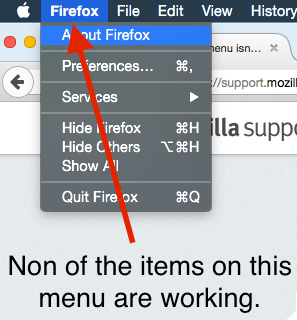
Try to remove the Firefox plist file (org.mozilla.firefox.plist).
- http://www.macfixit.com/article.php?story=20060606082246983 How .plist files become corrupt and troubleshooting the results
Go to "~/Library/Preferences" and remove the plist file for Firefox (org.mozilla.firefox.plist)
Try to repair the disk permissions:
选择的解决方案
I removed the plist file, repaired disk permissions, and restarted my computer. Didn't fix the issue. I decided to try downloading a fresh copy of Firefox, but that didn't help either. I tried a refresh again, but that still didn't help.
Finally, after trying many different things, I think I discovered the source of the problem: a conflict between the new tracking protection feature (even if it's disabled) in Firefox 41.0 and uBlock Origin (an extension). Oddly, just disabling the extension is not enough to fix the problem: the browser also has to be restarted.
I still don't have any idea why this is happening, but I've decided to disable and remove uBlock Origin since tracking protection provides essentially the same thing.
Thank you both for trying to help!
That was very good work. Well Done.