


How do I fix washed out colours for outset border in Firefox (vs Chrome)?

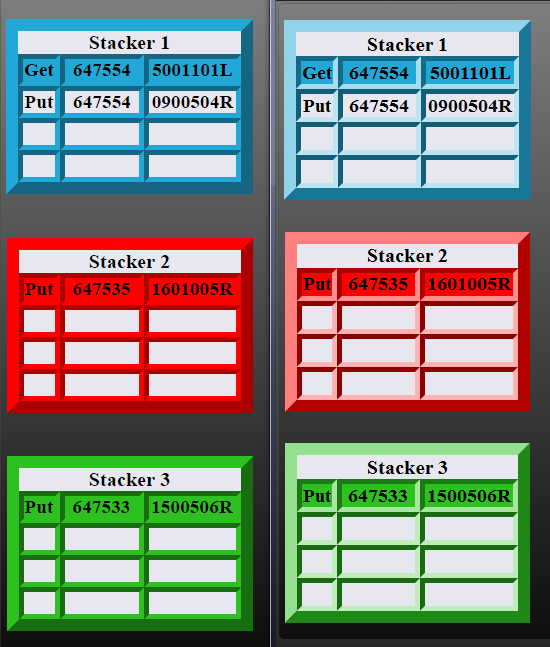
I've created a web page with a very basic table and border-style: outset. The attached image shows three colours ("red", "#2CC11F", and "#22A8D6") of this table, and how they appear on Chrome (left) vs Firefox (right).
The image is a screen capture, taken with both Firefox and Chrome on the same monitor.
I've tried every combination of items listed in the link here: (http://cameratico.com/guides/firefox-color-management/) and restarted Firefox each time, but I simply cannot get it to not display this outset border without looking terrible and washed out.
A solid border looks fine, so this has to do with outset borders specifically (and possibly on tables specifically).
被采纳的解决方案
So the problem is that Firefox is choosing shades that are too light compared with Chrome?
I think you'll need to take direct control of the colors of individual sides by using solid borders. For example:
定位到答案原位置 👍 1所有回复 (3)
Ok, I guess I found a bug related to this here: Ugly inset and outset borders
This bug first appeared 15 years ago. Astonishing it has not been fixed in 15 years!
选择的解决方案
So the problem is that Firefox is choosing shades that are too light compared with Chrome?
I think you'll need to take direct control of the colors of individual sides by using solid borders. For example:
Thanks!!!
The workaround was trivial (just never crossed my mind), but Firefox really should choose better shades as a default. These borders do look terrible vs the other major browsers.