


Why does the Firefox icon sometimes appear closed on the Mac OS X dock when that application is in fact open?

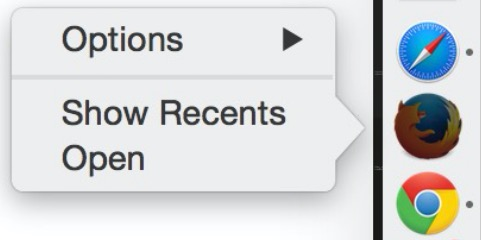
When Firefox is open, sometimes its dock icon still appears closed. The right-click context menu for the icon even has an "Open" option, which does nothing because Firefox is already open.
The attached image shows three open apps in the dock, yet the Firefox icon is the only one that isn't indicating that it's open.
由FireFoxFan89于修改
所有回复 (2)
HI FireFoxFan89, Is there any other behavior that you notice about when Firefox is open and the doc appears this way?
For example, if you move the doc does the dot not appear, is Firefox still running in your Activity Monitor, is there another Firefox icon at the end of your doc?
Yes, there is another Firefox icon at the end of my dock, and that one behaves normally. I didn't even notice it until you pointed out looking for another one.
由FireFoxFan89于修改