


Firefox 38.0.5 won't save downloads in the right place.

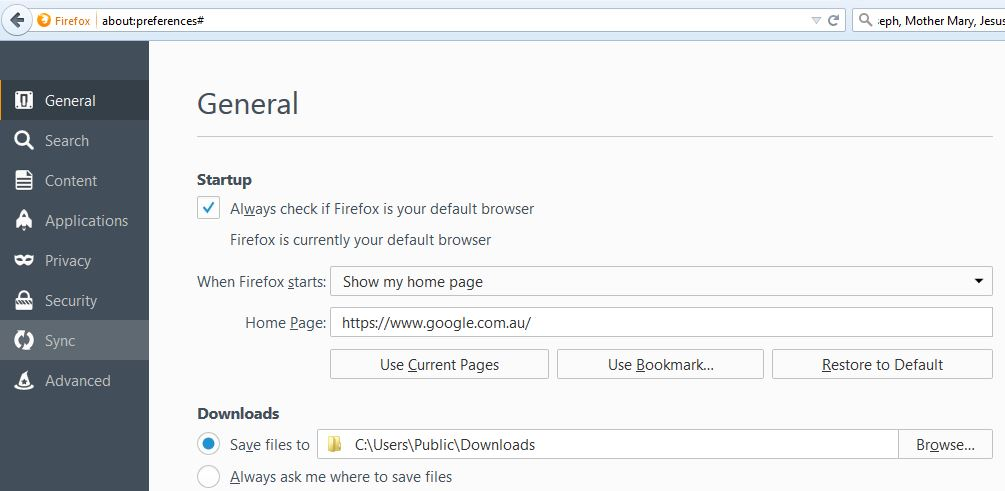
I have set the download to be saved to C:\Users\Public\Downloads, but it still saves to C:\Users\%username%\Downloads
所有回复 (4)
Hi Healer,
Step 1: The sharing settings might have been changed. Try the following steps to cross check if the Public folder sharing settings are correct. a. Open C:\Users, right click on Public folder, point to "Sharing with" and click on "Advanced sharing settings..." b. On the "Advanced sharing settings" you'll see three items namely: "Home or Work", Public and Domain (current profile) c. Click the down arrow button for "Home or Work" and Public d. Turn on all the options under them. e. Click Save changes button and close the window. f. Check if the issue persists.
I was on a public network which is in a public library when it simply saved into the personal download folder regardless of the specification.
It works when I am home now. It has put it in the right directory.
I reckon that FireFox should put up a message if it can't do what is supposed to do.
Anyway I have hard-coded the path as you can see from the screen capture. There is no but. Moreover, I have checked the networking setup and the Windows Explorer to make sure one accesses the download in the public folder when the download is selected.
You can try to rename (or delete) the content-prefs.sqlite file to content-prefs.sqlite.old in the Firefox profile folder to reset all website specific data.
You can use this button to go to the currently used Firefox profile folder:
- Help > Troubleshooting Information > Profile Directory: Show Folder (Linux: Open Directory; Mac: Show in Finder)
- http://kb.mozillazine.org/Profile_folder_-_Firefox
Thanks a lot.
Since it has been working in a private network and I am not in a hurry to have access to a public network, I can't test it for sure at the moment. I have to leave it for the time being. I shall keep you posted when I get round to it.
由healer于修改