


firefox cannot access mozilla.org after update

Firefox can no longer access any mozilla.org website after I updated it to 37.0.1. It isn't system time, or virus protection issues: my system time is set correctly and I accessed mozilla.org in chrome and copy/pasted that into my virus protection as an exception and Firefox still won't access the Mozilla website. I can now only do that in IE and Chrome, my other browsers. Further, the 'This Connection is Untrusted' error page will let me make an exception for mozilla.org, but I have to go through a lot of technical steps to do it. I then have to keep going through the same steps every time I restart Firefox. If I select mozilla.org, it get taken right to the Connection Untrusted web page on the https://www.mozilla.org/ website!
选择的解决方案
Skiddles said
Firefox can no longer access any mozilla.org website after I updated it to 37.0.1. It isn't system time, or virus protection issues: my system time is set correctly and I accessed mozilla.org in chrome and copy/pasted that into my virus protection as an exception and Firefox still won't access the Mozilla website. I can now only do that in IE and Chrome, my other browsers. Further, the 'This Connection is Untrusted' error page will let me make an exception for mozilla.org, but I have to go through a lot of technical steps to do it. I then have to keep going through the same steps every time I restart Firefox. If I select mozilla.org, it get taken right to the Connection Untrusted web page on the https://www.mozilla.org/ website!
I rebooted in safe mode and got the 'Connection Untrusted' error page and (again) created an exception for the mozilla.org webpage. I exited Firefox browser and re-entered and tried to go to a mozilla.org webpage, and again got the 'connection untrusted' error page.
As I have already reported the 'Technical Details' says: "www.mozilla.org uses an invalid security certificate / The certificate is not trusted because the issuer certificate is unknown. / (Error code: sec_error_unknown_issuer)"
However, I did go into options/advanced/view certificates and deleted every single certificate except for mozilla.org. When I reran firefox, I had to put in a new exception for google since I used it to put up the mozilla.org websites, and then everything seemed to work OK. I went back and saw that most of the certificates had been restored after requesting it to verify google.
I cannot say which deleted certificate was the one that seemed to be causing the problem.
由Skiddles于修改
所有回复 (3)
hi Skiddles, a possible solution depends on different factors:
- what is the error code shown under technical details on the error page?
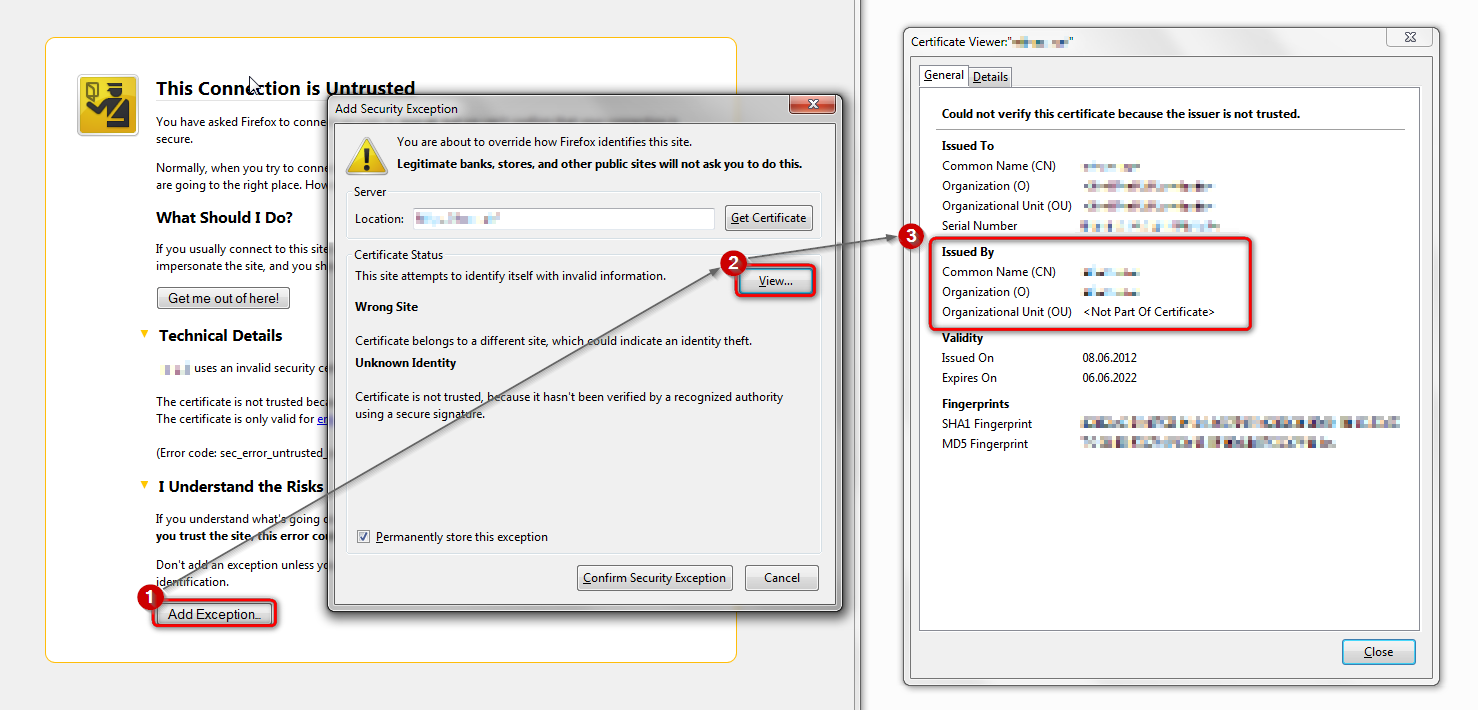
in case the error code equals sec_error_unknown_issuer, please attempt to add an exception on the bottom of the error page in order to inspect the certificate like it is shown on the screenshot attached:
- which issuer information does the certificate contain?
please report back with those two pieces of information. thank you!
Boot the computer in Windows Safe Mode with network support (press F8 on the boot screen) as a test.
选择的解决方案
Skiddles said
Firefox can no longer access any mozilla.org website after I updated it to 37.0.1. It isn't system time, or virus protection issues: my system time is set correctly and I accessed mozilla.org in chrome and copy/pasted that into my virus protection as an exception and Firefox still won't access the Mozilla website. I can now only do that in IE and Chrome, my other browsers. Further, the 'This Connection is Untrusted' error page will let me make an exception for mozilla.org, but I have to go through a lot of technical steps to do it. I then have to keep going through the same steps every time I restart Firefox. If I select mozilla.org, it get taken right to the Connection Untrusted web page on the https://www.mozilla.org/ website!
I rebooted in safe mode and got the 'Connection Untrusted' error page and (again) created an exception for the mozilla.org webpage. I exited Firefox browser and re-entered and tried to go to a mozilla.org webpage, and again got the 'connection untrusted' error page.
As I have already reported the 'Technical Details' says: "www.mozilla.org uses an invalid security certificate / The certificate is not trusted because the issuer certificate is unknown. / (Error code: sec_error_unknown_issuer)"
However, I did go into options/advanced/view certificates and deleted every single certificate except for mozilla.org. When I reran firefox, I had to put in a new exception for google since I used it to put up the mozilla.org websites, and then everything seemed to work OK. I went back and saw that most of the certificates had been restored after requesting it to verify google.
I cannot say which deleted certificate was the one that seemed to be causing the problem.
由Skiddles于修改