


Can't get my Thunderbird to move from POP to IMAP - with Comcast.

Using Thunderbird w/Comcast for years. No longer works. Per Comcast they turned off POP and now only use IMAP. I can't get Thunderbird to work with IMAP. I've read the support articles - no resolve.
Thanks!
由baschumann于修改
所有回复 (9)
No idea what you have read or done so far. Here are the settings. Add the account. Do not try to change your POP account settings to IMAP. http://customer.comcast.com/help-and-support/internet/email-client-programs-with-xfinity-email/
Get the error "Configuration could not be verified - is the username or password wrong" -
I know it's the right username and password, I've entered it over and over (and even tested it on the comcast website).
Has Comcast converted your account to IMAP. everything I read about this says they have to do the conversion first. Comcast is still only POP in this area so I cannot try it. Incorrect server settings also give the error you are seeing. Make sure they are correct.
I am using these instructions: http://customer.comcast.com/help-and-support/internet/setting-up-thunderbird/
Get the error shown in the attached.
I did contact Comcast support to ensure my account was set to IMAP and was assured that it was.
Also, if I go in and delete all my Thunderbird accounts in the app - what happens to all the emails? Personal folders? When I rebuild do they reappear or ?
Thx.
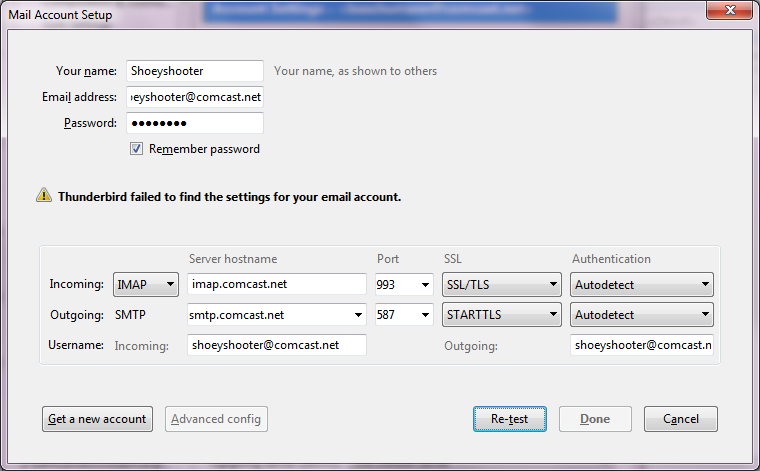
I cannot get your attachment to open but there is a misprint, in my opinion, in the Comcast article. The text says use IMAP.Comcast.net for outgoing but the example image shows SMTP.Comcast.net. The image would be the correct server name for outgoing.
Right - caught the typo....updated it to smtp.comcast.net before I tried to set-up.
In the directions it shows you that after you enter your info in the first screen you will get a window that advises manual config - I never get that window...it appears that Thunderbird isn't detecting me as a valid email address with Comcast. It says "Thunderbird failed to find the settings for your email account". If you then go through and set-up everything as they have suggested you get the error "configuration could not be verified - is the user name or password wrong" - it isn't I've checked on web sign-in and re-typed it a dozen times.
Here is an article on manual account entry. It mentioned pressing stop or cancel during the auto setup to change your settings. maybe this will help.
https://support.mozilla.org/en-US/kb/manual-account-configuration
I wish I had a better suggestion. I am running out of ideas.
So the stars just aligned ;-)
As I sat here wondering what the heck....I noticed my virus s/w wasn't turned on....not sure why. Anyway, I started a scan just to make sure things were kosher.
Went back to troubleshooting the mail issue and suddenly everything started downloading.
We're good - thanks for hanging with me, much appreciated :-)
Yes!!!