I can no longer access facebook, yahoo, even firefox support from the webbrowser!

I do not have any problem connecting to these websites from IE. What is going on with firefox?
YAHOO - "This Connection is Untrusted - You have asked Firefox to connect securely to www.yahoo.com, but we can't confirm that your connection is secure. Normally, when you try to connect securely, sites will present trusted identification to prove that you are going to the right place. However, this site's identity can't be verified. What Should I Do? If you usually connect to this site without problems, this error could mean that someone is trying to impersonate the site, and you shouldn't continue."
FACEBOOK - "This Connection is Untrusted - You have asked Firefox to connect securely to www.facebook.com, but we can't confirm that your connection is secure. Normally, when you try to connect securely, sites will present trusted identification to prove that you are going to the right place. However, this site's identity can't be verified. What Should I Do? If you usually connect to this site without problems, this error could mean that someone is trying to impersonate the site, and you shouldn't continue."
FIREFOX - "This Connection is Untrusted - You have asked Firefox to connect securely to download.mozilla.org, but we can't confirm that your connection is secure. Normally, when you try to connect securely, sites will present trusted identification to prove that you are going to the right place. However, this site's identity can't be verified. What Should I Do? If you usually connect to this site without problems, this error could mean that someone is trying to impersonate the site, and you shouldn't continue."
所有回复 (1)
hello Sasco9000, first please make sure that the date, time & timezone are set correctly on your system. if this doesn't solve the issue (or it is already set properly), a possible solution depends on different factors:
- what security software are you using?
- what is the error code shown under technical details on the error page?
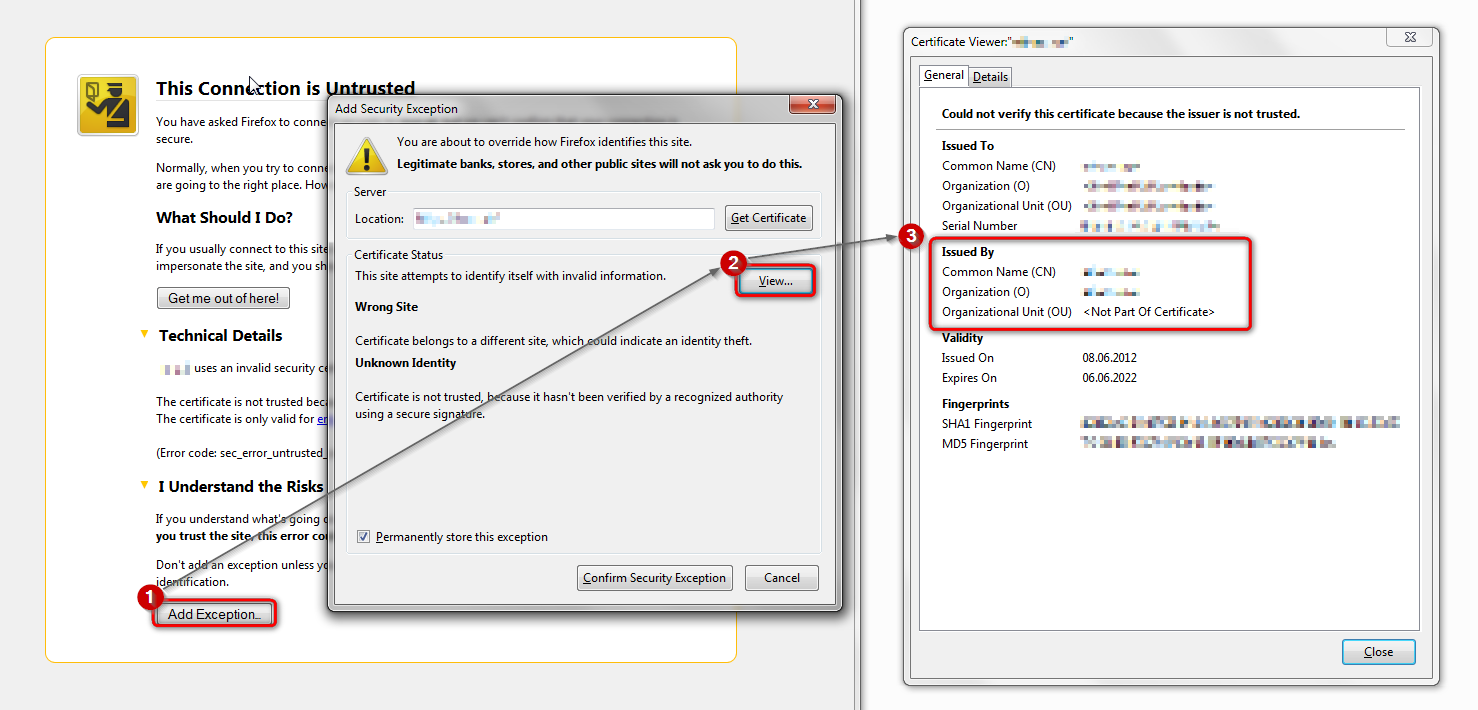
in case the error code equals sec_error_unknown_issuer, please attempt to add an exception on the bottom of the error page - don't add it for real, but inspect the certificate (see the screenshot attached for instructions):
- which issuer information does the certificate contain?
please report back with this information. thank you!
"This Connection is Untrusted" error message appears - What to do