


Error "a plugin is needed to display this content" for embedded Google map, but no plugin identified.

When I try to view a page that has a Google map embedded on the page, I get the error message "a plugin is needed to display this content". However, I don't know what plugin, where to get it, etc. I've tried searching for this issue but haven't been able to come up with anyone else experiencing a similar issue, nor does there seem to be a plugin for Google Maps that I can find.
The page is here: http://osiama.org/lodges#
The map displays when one of the links is clicked in the table.
被采纳的解决方案
I was going to suggest adding type="text/html" into the embed tag but found a discussion saying that doesn't work: http://stackoverflow.com/questions/17688628/firefox-tells-user-they-need-a-plugin-to-display-an-embedded-webpage
Following the cue in that thread, what about placing your embed inside an object tag like this:
<object type="text/html" data="https://www.google.com/maps/embed/v1/place?key=AIzaSyA4e2zvSt_VeKb6u_IMvBSAuIPPINgfzNU&q=Nazzaro+Community+Center&zoom=15" height="300" width="450" frameborder="0" style="border:0;">
  <embed src="https://www.google.com/maps/embed/v1/place?key=AIzaSyA4e2zvSt_VeKb6u_IMvBSAuIPPINgfzNU&q=Nazzaro+Community+Center&zoom=15" height="300" width="450" frameborder="0" style="border:0;">
</object>
So in other words, browsers that can use the object tag will do so, but for those that do not, the embed is still in there. Does that work?
定位到答案原位置 👍 3所有回复 (6)
I'm not sure why, but the site uses <embed> for the map instead of <iframe>.
When Firefox wants to render an <embed>, it needs to know what type of object is being embedded, and the site doesn't supply that information, so you see a generic "I don't know how to handle this" error.
Unfortunately, I don't think there is a quick workaround for you as the end user. If you are the type to tinker, you can manually edit the code of the page in the web console as follows:
- right-click the plugin message and choose Inspect Element (Q) - the web console will open to the Inspector, with the <embed> element selected (screen shot #1)
- double-click embed and edit it to iframe, then press Enter to finish the edit
- Firefox will now load the map (screen shot #2)
This isn't a general fix-all for plugin errors, and ultimately the site will need to change this.
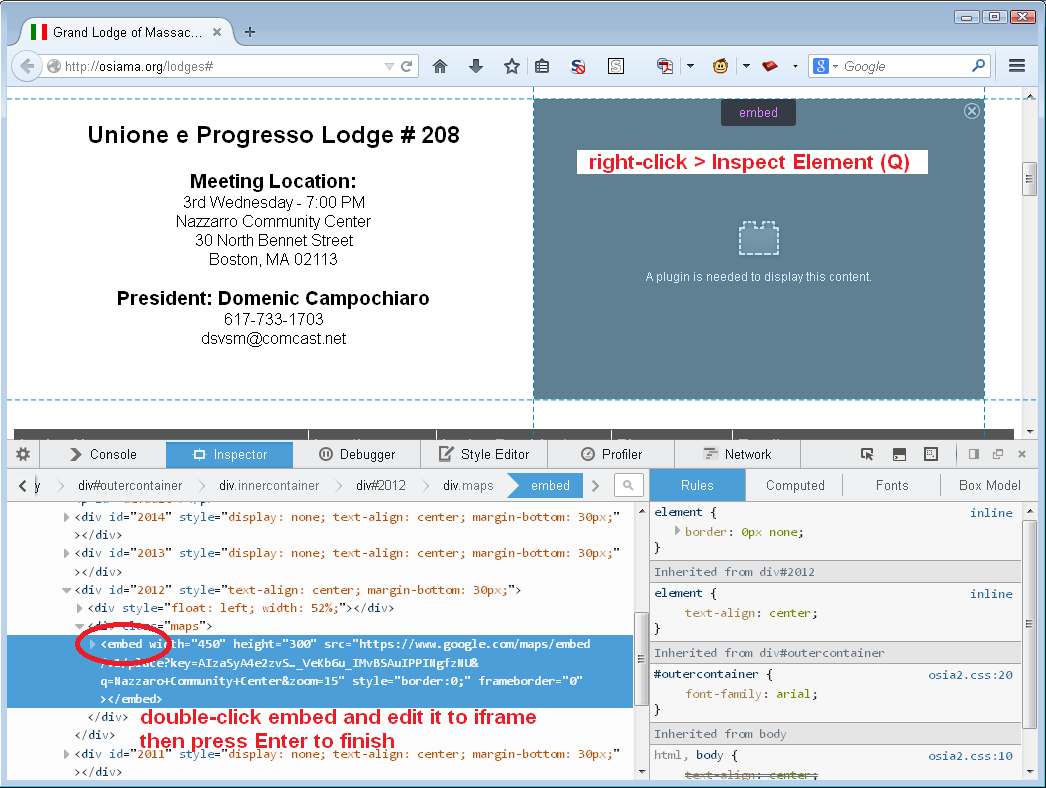
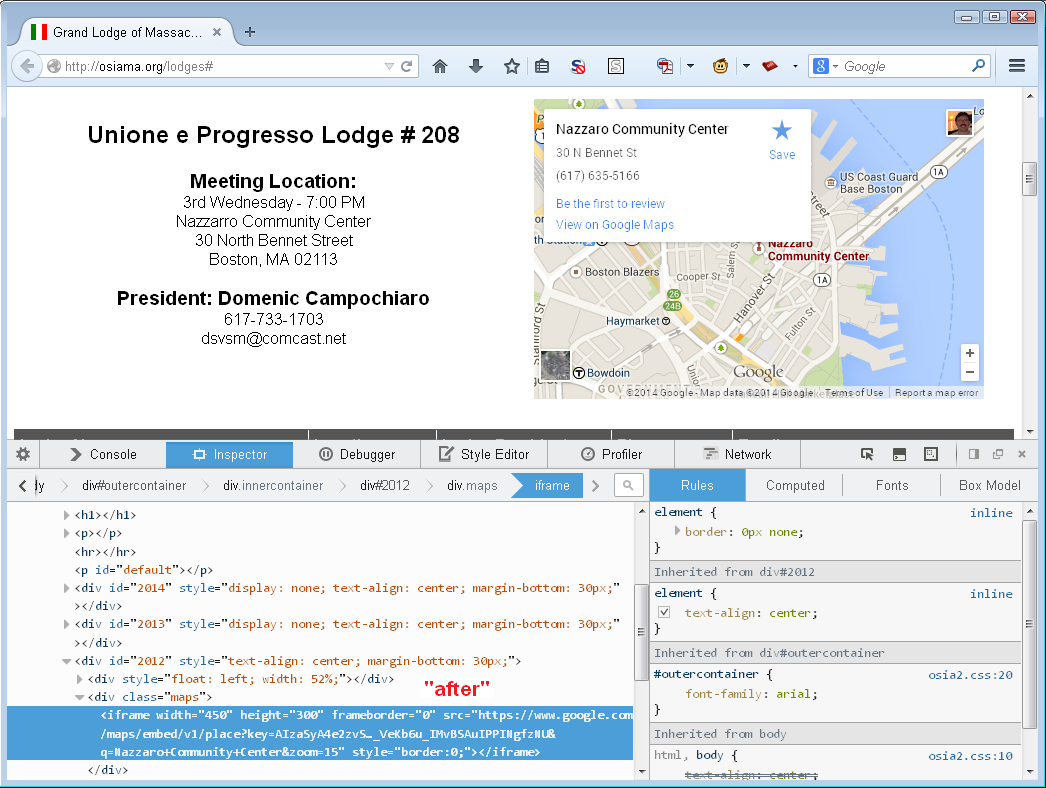
Another possibly is to use a bookmarklet like this to replace the embed by an iframe.
javascript:(function(){var eE=document.querySelectorAll('embed[src*="//www.google.com/maps/"]'),i;for(i=0;E=eE[i];i++){N=document.createElement('iframe');for(j in E.attributes){A=E.attributes[j];if((A.name!=undefined)&&(A.value!=undefined)){N.setAttribute(A.name,A.value)}}E.parentNode.replaceChild(N,E)}})()
It's using <embed> at the moment because the map doesn't load or render correctly when it's embedded using an iframe. The map loads correctly with the embed tag in IE and Chrome, so it's just Firefox that is causing the issue.
Is there something I can add to help Firefox be able to identify the object better?
选择的解决方案
I was going to suggest adding type="text/html" into the embed tag but found a discussion saying that doesn't work: http://stackoverflow.com/questions/17688628/firefox-tells-user-they-need-a-plugin-to-display-an-embedded-webpage
Following the cue in that thread, what about placing your embed inside an object tag like this:
<object type="text/html" data="https://www.google.com/maps/embed/v1/place?key=AIzaSyA4e2zvSt_VeKb6u_IMvBSAuIPPINgfzNU&q=Nazzaro+Community+Center&zoom=15" height="300" width="450" frameborder="0" style="border:0;">
  <embed src="https://www.google.com/maps/embed/v1/place?key=AIzaSyA4e2zvSt_VeKb6u_IMvBSAuIPPINgfzNU&q=Nazzaro+Community+Center&zoom=15" height="300" width="450" frameborder="0" style="border:0;">
</object>
So in other words, browsers that can use the object tag will do so, but for those that do not, the embed is still in there. Does that work?
This seems to have solved the problem. Thanks so much!
Oop. Spoke slightly too soon - while the map displays, it encounters the original issue that I was trying to avoid when using iframes in the first place: the map doesn't center correctly. For some reason, using embed tags on every other browser solves this issue, but the object tag doesnt for Firefox.
(Usually Firefox is the last browser to give me problems, yeesh.)