


i am always prompted when opening a pdf file

I have tried all the fixes listed on the help site and I always get prompted as to how to open a pdf file. I have Acrobat Pro 6.0 and Acrobat Reader 10. I uninstalled and reinstalled reader 10. I can set the application tab for pdf files to Use Adobe Acrobat (in Firefox), but everytime I click on a pdf file I am prompted as to what application I want to use to open the file. The only option I have is "Acrobat 6.0 (default)", or save file. I have deleted the mime file and the plugin.dat file with no help.
Tüm Yanıtlar (4)
Hi lajet59,
Have you looked at the View and edit PDF files using Firefox’s built-in viewer Knowledge Base article? It offers a couple of solutions in there. I would try both just to be safe.
If that doesn't work you should look at the article How to fix preferences that won't save. Firefox might be having trouble writing to your preferences file.
Hopefully this helps!
Thank you for the reply. I had tried all the suggestions in the viewing pdf files section of the help. I also deleted the prefs.jr files and it did not fix the problem.
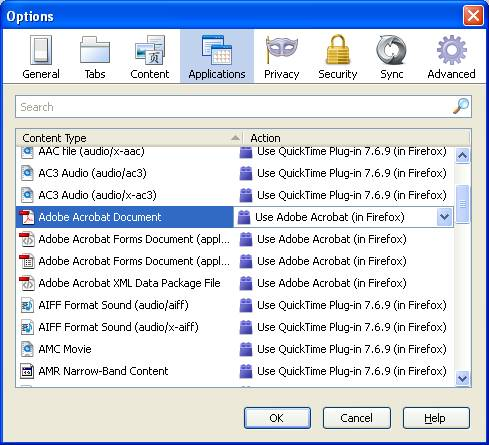
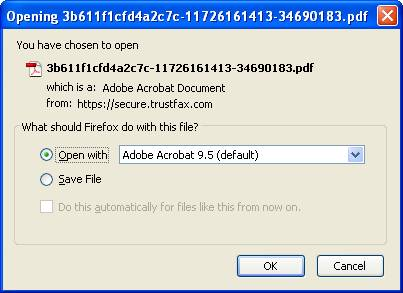
I am attaching the two dialog snap shots to help explain what my problem is.
The first is the application setting showing Adobe in Firefox as the setting I have selected. The second is the prompt I receive everytime I try to view a pdf file by clicking on it.
Jeff
You need to delete mimeTypes.rdf to reset download actions.
Thanks, I have deleted that file multiple times and I still get prompted. I went through the opening pdf in Firefox section and deleted all the files they suggested and I still get the prompts.
Jeff