"Options" button in yellow "blocked remote content" banner missing. Cannot show or allow remote content

Previously the yellow banner with the text "To protect your privacy, Thunderbird has blocked remote content in this message" had an Options button which allowed me to click "show remote content" or allow subdomains to permanently show remote content. That options button is now missing, and there's only a X button to close the warning banner.
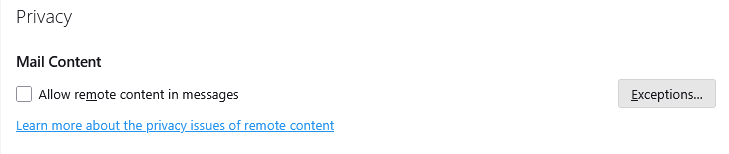
My Privacy settings has "Allow remote content in message" unchecked and there are no Exceptions. On mobile Thunderbird I can still "show remote images" successfully.
v128.4.3, Flatpak

Tüm Yanıtlar (4)

Hi there, I hope you're having a wonderful day!
If you want to fix the missing options button in Thunderbird's remote content banner, try going to the Privacy settings and ensuring remote content in messages is unchecked. Check that no exceptions are added.
You can also try resetting the 'mail news. display. disable_remote_image' setting to 'false' in the 'about:config' section. If that doesn't work, test in Safe Mode to see if an add-on is causing the issue or update/reinstall Thunderbird to fix potential bugs.
Mike Taku
Mike Taku said
Hi there, I hope you're having a wonderful day! If you want to fix the missing options button in Thunderbird's remote content banner, try going to the Privacy settings and ensuring remote content in messages is unchecked. Check that no exceptions are added. You can also try resetting the 'mail news. display. disable_remote_image' setting to 'false' in the 'about:config' section. If that doesn't work, test in Safe Mode to see if an add-on is causing the issue or update/reinstall Thunderbird to fix potential bugs. Mike Taku
As mentioned I've already done the first two. Changing `mailnews.message_display.disable_remote_image` to false hasn't resolved the issue, nor did Safe Mode nor reinstalling TB.
flashily.jockey945 said
Previously the yellow banner with the text "To protect your privacy, Thunderbird has blocked remote content in this message" had an Options button which allowed me to click "show remote content" or allow subdomains to permanently show remote content. That options button is now missing, and there's only a X button to close the warning banner. My Privacy settings has "Allow remote content in message" unchecked and there are no Exceptions. On mobile Thunderbird I can still "show remote images" successfully. v128.4.3, Flatpak
I tried both solutions mentioned without any change. Then I un-installed and re-installed Thunderbird with no improvement.