

Bu başlık arşivlendi.
Yardıma ihtiyacınız varsa lütfen yeni bir soru sorun.

Arşivlendi
Folder panel, does not always show where the newly received posts are
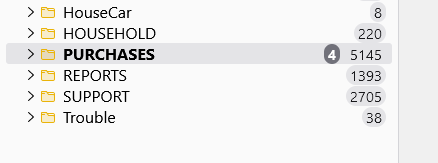
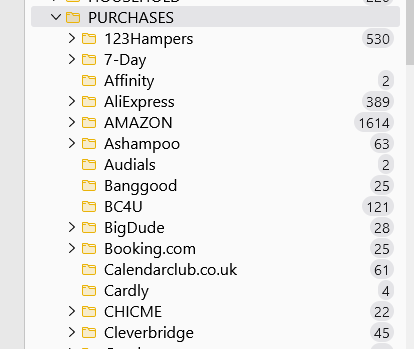
Hopefully, the attachments will show what the problem is... On a top-level account folder, I have a folder called PURCHASE, under this, I have about 45 entries of sub-folders. The fact that the top folder shows 4 to read, they do not show. I've waited at least 30 minutes, they don't appear. I then have to open each sub-folder to find the one with a new email. This does not happen all the time. (just most). Any idea what can cause this? NOTE: If I switch on the 'Show total message count' it happens more often.
W10 Pro Fully updated. Regards Princy557
Hopefully, the attachments will show what the problem is...
On a top-level account folder, I have a folder called PURCHASE, under this, I have about 45 entries of sub-folders.
The fact that the top folder shows 4 to read, they do not show. I've waited at least 30 minutes, they don't appear. I then have to open each sub-folder to find the one with a new email.
This does not happen all the time. (just most).
Any idea what can cause this?
NOTE: If I switch on the 'Show total message count' it happens more often.
W10 Pro Fully updated.
Regards
Princy557
Tüm Yanıtlar (2)
What version please?
115.2.0 (64) Thanks reply