


Windows 10 reached EOS (end of support) on October 14, 2025. For more information, see this article.

Mozilla Destek’te Ara

Destek dolandırıcılığından kaçının. Mozilla sizden asla bir telefon numarasını aramanızı, mesaj göndermenizi veya kişisel bilgilerinizi paylaşmanızı istemez. Şüpheli durumları “Kötüye kullanım bildir” seçeneğini kullanarak bildirebilirsiniz.

Daha Fazlasını Öğren

URL bar custom search engines - only click once

  • 4 yanıt
  • 0 kişi bu sorunu yaşıyor
  • 78 gösterim
  • Son yanıtı yazan: cor-el

diğer seçenekler

When using custom search engines:

In the search bar, all you have to do is click once on the engine icon and it searches. In the URL bar you have to select the search engine icon and then click "search with".

Is there a way to eliminate the second click in the URL bar?

Thanks.

Windows 10, Firefox 114.0.1
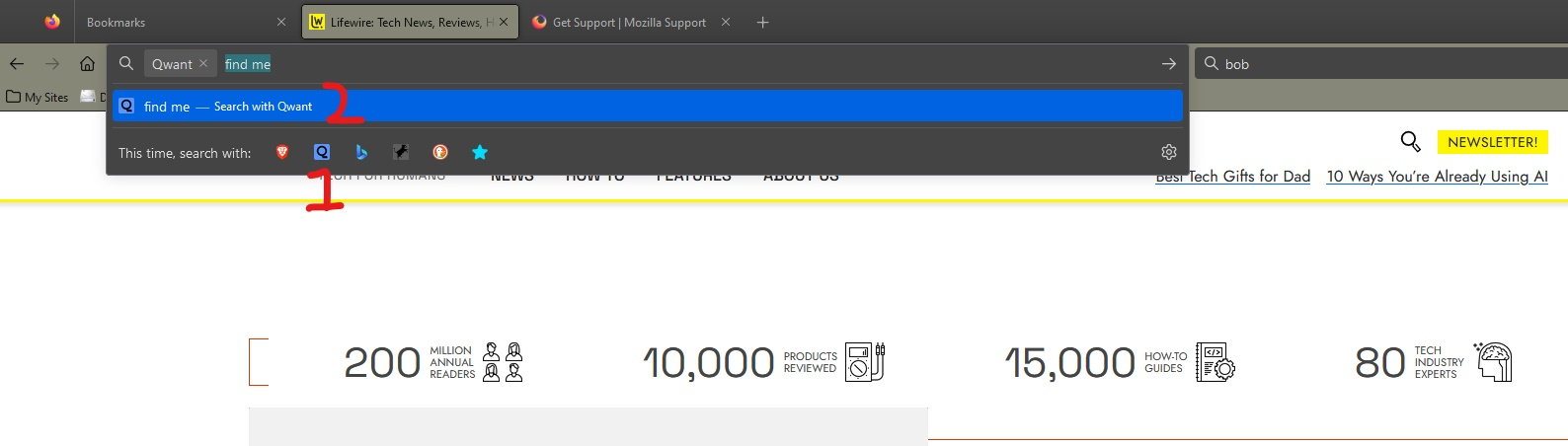
When using custom search engines: In the search bar, all you have to do is click once on the engine icon and it searches. In the URL bar you have to select the search engine icon and then click "search with". Is there a way to eliminate the second click in the URL bar? Thanks. Windows 10, Firefox 114.0.1
Ekli ekran görüntüleri

Seçilen çözüm

Shift-Click the icon. Or click it and press Enter.

Bu yanıtı konu içinde okuyun 👍 0

Tüm Yanıtlar (4)

diğer seçenekler

Seçilen çözüm

Shift-Click the icon. Or click it and press Enter.

diğer seçenekler

You can also initiate the search by typing an '@' and select the search engine.

diğer seçenekler

Thanks, that's helpful.

I was hoping something like an about:config hack, but I'll mark it solved.

diğer seçenekler

You can set a (one-letter) keyword to a search engine by double-clicking the keyword column on the "Settings -> Home" page and type this keyword and a space to use this search engine.