


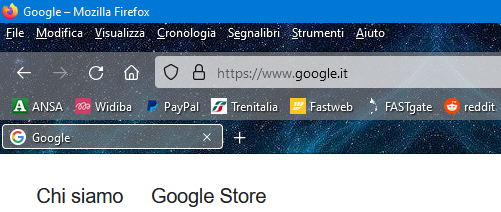
Hi! Can anyone please help me restore CSS customizations, now that the latest 100.0 update has compromised them?
My CSS has always been directed to two effects:
- tabs on bottom - general transparency of the bars
The latest update luckily spared the former, but not the latter! Anyway, this time I haven't been able to solve it on my own, unfortunately...
❦
My current userChrome is:
And my "special" about:config settings, which I've customized over the years to set everything back to how it looked before the progressive updates, are:
accessibility.typeaheadfind.manual - FALSE
toolkit.legacyUserProfileCustomizations.stylesheets - TRUE
print.save_print_settings - FALSE
browser.download.autohideButton - FALSE
browser.proton.contextmenus.enabled - FALSE
browser.proton.enabled - FALSE
extensions.pocket.enabled - FALSE
layout.css.prefers-color-scheme.content-override - 1
browser.theme.content-theme - 1
browser.theme.toolbar-theme - 1
browser.download.improvements_to_download_panel - FALSE
browser.download.alwaysOpenPanel - FALSE
❦
Can anyone please suggest a solution? Thanks for your attention!
Seçilen çözüm
I think your code for removing the toolbar haze is:
  /* Transparent toolbars */
#main-window[lwthemetextcolor="bright"] #navigator-toolbox > toolbar:not(#toolbar-menubar):not(#TabsToolbar) {
  background-color: transparent !important;
  background-image: none !important;
}
This is what I posted in another thread 11 months ago, but haven't tested recently:
/*** Theme visibility: clean haze and lines from toolbars ***/
#nav-bar, #PersonalToolbar {
  /* Remove Haze */
  background: transparent !important;
  /* Remove Line at top of nav bar */
  box-shadow: none !important;
}
Does that still work with your theme?
Tüm Yanıtlar (5)
WARNING from the moderator team: userChrome.css scripts are not provided by Mozilla and are not officially supported. Firefox is a work in progress and, to allow for continuous innovation, Mozilla cannot guarantee future updates won’t impact your customizations. For this reason, Mozilla does not officially support style rules customization.
Please read Firefox Advanced Customization and Configuration Options to learn more.
Seburo said
WARNING from the moderator team: userChrome.css scripts are not provided by Mozilla and are not officially supported. Firefox is a work in progress and, to allow for continuous innovation, Mozilla cannot guarantee future updates won’t impact your customizations. For this reason, Mozilla does not officially support style rules customization. Please read Firefox Advanced Customization and Configuration Options to learn more.
Thanks for your reply.
Do you mean there's a way I can get general transparency of the bars and tabs on bottom without userChrome.css customizations?
You can look at his forum response for CSS code in userChrome.css for Firefox 89+ to move the tabs to below the Navigation Toolbar.
Seçilen çözüm
I think your code for removing the toolbar haze is:
  /* Transparent toolbars */
#main-window[lwthemetextcolor="bright"] #navigator-toolbox > toolbar:not(#toolbar-menubar):not(#TabsToolbar) {
  background-color: transparent !important;
  background-image: none !important;
}
This is what I posted in another thread 11 months ago, but haven't tested recently:
/*** Theme visibility: clean haze and lines from toolbars ***/
#nav-bar, #PersonalToolbar {
  /* Remove Haze */
  background: transparent !important;
  /* Remove Line at top of nav bar */
  box-shadow: none !important;
}
Does that still work with your theme?
jscher2000 - Support Volunteer said
I think your code for removing the toolbar haze is:/* Transparent toolbars */ #main-window[lwthemetextcolor="bright"] #navigator-toolbox > toolbar:not(#toolbar-menubar):not(#TabsToolbar) { background-color: transparent !important; background-image: none !important; }
This is what I posted in another thread 11 months ago, but haven't tested recently:/*** Theme visibility: clean haze and lines from toolbars ***/ #nav-bar, #PersonalToolbar { /* Remove Haze */ background: transparent !important; /* Remove Line at top of nav bar */ box-shadow: none !important; }
Does that still work with your theme?
I tried replacing that part of code with the one you suggested and it worked perfectly: thank you so much! Best regards