


Firefox update changed icon to PDF???

firefox updated itself, which normally would be fine, but now there is a PDF icon in place of my normal firefox icon, and I am afraid to use it now. Is it for real?, can I change the icon back to the old firefox one? Please let me know cause I won't use it now until I know for sure that it's ok and get it back as it was. thank you, Linda
Tüm Yanıtlar (2)

Seçilen çözüm
Hello lyndastuff,
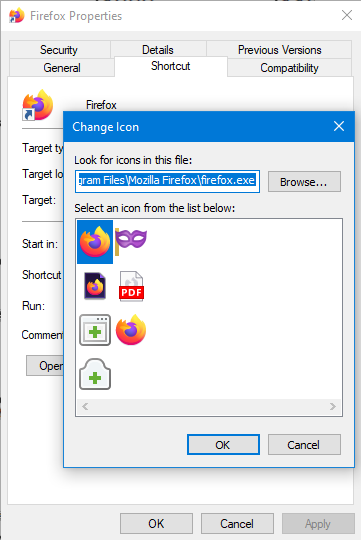
Assuming that you launch Firefox using a desktop shortcut, you can right-click the Firefox icon (the shortcut you normally click), click "Properties", click "Shortcut" (which is a tab on top), and click "Change Icon...". You should be able to select from a list of icons and from there, you can just select the usual Mozilla Firefox icon. You can refer to the attached screenshot for additional context if needed.
Hopefully this answer helps, and if it does, kindly mark it as the solution(solved)!
Thank you for an easy solution!