


file downloads

Recently pdf files I download are getting saved in my Downloads folder automatically. They are also opened in Adobe Reader as specified in settings. I don't know what version this started with but it didn't always happen. I don't want these files filling up my Downloads folder so how can I prevent this?
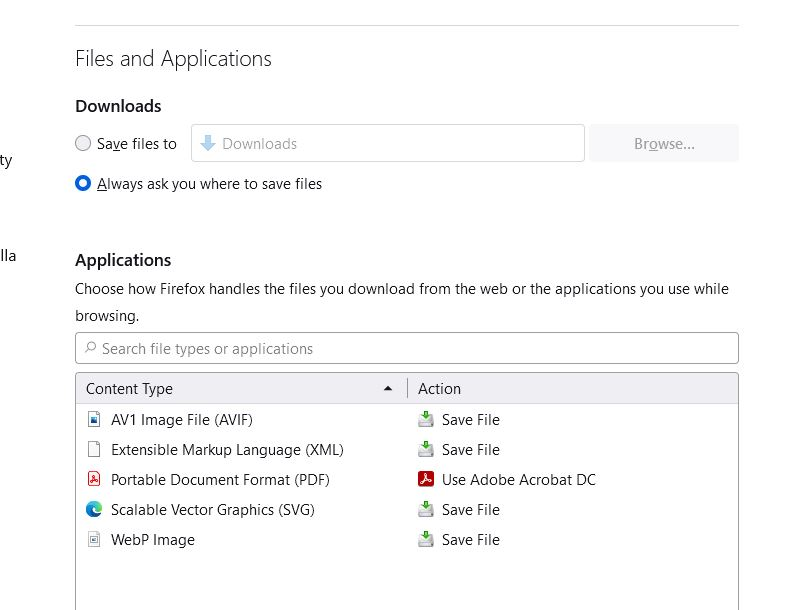
Seçilen çözüm
The preference to reverse the changes will only work temporarily.
https://support.mozilla.org/en-US/questions/1370494
To change the destination folder or enable you to pick a folder, see the answer linked below.
https://support.mozilla.org/en-US/questions/1374319#answer-1501074
Bu yanıtı konu içinde okuyun 👍 0Tüm Yanıtlar (2)

https://www.mozilla.org/en-US/firefox/98.0/releasenotes/ Firefox has a new optimized download flow . . . .
https://support.mozilla.org/en-US/kb/manage-downloads-preferences-using-downloads-menu Changes to how file downloads are handled in Firefox version 98
- Firefox no longer asks what to do for each file by default
- Downloads panel automatically opens
- Downloaded files are saved to disk
- Set a default app to open a file type
- "Always Open Similar Files" option from the Downloads panel
- Frequently asked questions
You can set this pref to false on the about:config page to prevent opening the
download panel on each download.
- browser.download.alwaysOpenPanel = false
You can open the about:config page via the location/address bar. You can accept the warning and click "I accept the risk!" to continue.

Seçilen çözüm
The preference to reverse the changes will only work temporarily.
https://support.mozilla.org/en-US/questions/1370494
To change the destination folder or enable you to pick a folder, see the answer linked below.
https://support.mozilla.org/en-US/questions/1374319#answer-1501074