


reload tab symbol

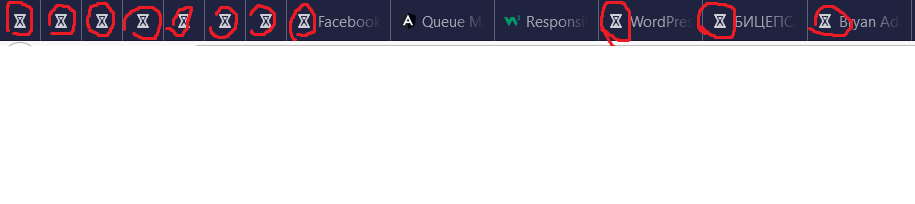
Hi , I have a problem with reload tab symbol, because its changed after i install last version of firefox. it was "spinning dots" to a single dot that goes back and forth (left to right) now it is like this ⌛....(also i will insert the screenshot)...how i can change it ? when i am installing firefox i put my settings in about:profiles it is just Firefox Tweaks for privacy from this site : ( https://www.privacytools.io/browsers/#about_config ) I changed all settings and still same symbol ⌛... also try to log in, in safe mode but same result... plese helpe me with is it ...
Tüm Yanıtlar (4)
Seçilen çözüm
Try to switch the pref ui.prefersReducedMotion = 0.
Unfortunately same problem...
thanks it worked, I write option mistakenly.. mistake: "the pref ui.prefersReducedMotion = 0." correct: " ui.prefersReducedMotion = 0."
Firefox 63+ has support for "@media (prefers-reduced-motion)" to honor system settings to minimize the amount of non-essential motion.
In Firefox 78+ this includes the location bar breakout. In Firefox 80+ this replaces the tab loading indicator with an hourglass.
- set the value to 1 if you want to block animations
ui.prefersReducedMotion = 1 - set its value to 0 if you want to see animations
ui.prefersReducedMotion = 0
See also: