


Cannot add second Gmail address to Thunderbird with POP settings
I have one Gmail account in Thunderbird, set up with POP settings, that is working perfectly. I'm trying to add another Gmail account, but it's saying I have the wrong settings/username/password (I don't). I already made sure that "less secure" is off on my Gmail settings and that Thunderbird is a trusted app. I CAN get it to work if I set it as IMAP, but I want to keep all my emails on the server. Thanks in advance!
Seçilen çözüm
Is there an error message when you try to add the account? None are visible in your pictures. What is the antivirus? I suggest you remove all passwords and tokens for both accounts in Options/Privacy & Security/Passwords/Saved Passwords, change the authentication to OAuth2 for both servers, incoming and outgoing, for the existing account, confirm that cookies are allowed in Privacy & Security, then restart TB and enter the password for the existing account in the OAuth browser window. Next, add the 2nd account as before, but set the authentication to OAuth2 for incoming and outgoing. If OAuth2 doesn't appear automatically or in the config window menu, click Advanced config. and set the authentication in Account Settings. When the 2nd account is set up, click Done, enter the account password in the OAuth window when prompted, like before.
Using OAuth2 makes it unnecessary to allow 'less-secure apps' in the Google account settings.
Bu yanıtı konu içinde okuyun 👍 1Tüm Yanıtlar (10)

it's saying I have the wrong settings/username/password (I don't).
So what are your settings?
Here's how my other one is set, so I made it the same.

For the incoming POP3 server, set the 'Authentication method' to 'OAuth2'. Use your main Google account password, no app passwords.
I already made sure that ... Thunderbird is a trusted app.
What does this mean?
Tried those settings and it still won't work with POP3. I went into my Google security and made sure less secure apps was on and that Thunderbird (Mozilla) was a trusted app. It doesn't matter if I manually configure the settings or let it auto-detect. I still get the error. The only way it'll work is IMAP, which I don't want to do.
Do you have POP enabled for the account in gmail settings (see picture)?
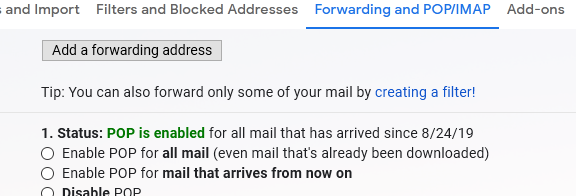
Yes, I do.
Seçilen çözüm
Is there an error message when you try to add the account? None are visible in your pictures. What is the antivirus? I suggest you remove all passwords and tokens for both accounts in Options/Privacy & Security/Passwords/Saved Passwords, change the authentication to OAuth2 for both servers, incoming and outgoing, for the existing account, confirm that cookies are allowed in Privacy & Security, then restart TB and enter the password for the existing account in the OAuth browser window. Next, add the 2nd account as before, but set the authentication to OAuth2 for incoming and outgoing. If OAuth2 doesn't appear automatically or in the config window menu, click Advanced config. and set the authentication in Account Settings. When the 2nd account is set up, click Done, enter the account password in the OAuth window when prompted, like before.
Using OAuth2 makes it unnecessary to allow 'less-secure apps' in the Google account settings.
Here are my settings and the error I'm getting. Trying your suggestions now...


It was the OAuth2 in the incoming that made the difference! Thank so much for walking me through it!
Yes, it's 'wrong configuration'. Authentication must be the same, OAuth2, for incoming and outgoing.