My columns keep changing order

Each of my email account has their own order for the columns in Inbox, Draft, Sent .... e.g. "Sender / Subject/ Date/ Size .... Now when I go from one folder to another, say from Sent to Junk the order and the actual columns change back to some other order e.g.. Thread/Star/Subject/Read/Date/ they are not permanent. I tried Safe Mode but my newly sorted columns still switch back to another (random?) order.

Tüm Yanıtlar (20)
I use Thunderbird for years and now am on V 78.6
Anyone? And Merry Christmas *<;-)}}}
Back to top
Still hoping for an answwer. Thx
As I see no one else reporting the issue, I have to suppose you have some form of file corruption in your profile.
goto the troubleshooting information on the help menu and open the profile folder using the button there. Close Thunderbird. Delete the session.json file and restart Thunderbird.
Now se if changes are saved.
Hi Matt, Thx for picking up the issue. No deleting the sessions.json did not help. Still when I rearranged the columns in my Inbox. Then go to another folder. Then when I go back to the Inbox the order was reversed again.
I am still trying to find a solution :-(
as the data is stored in the file you deleted there is no corruption. you claim it occurs in safe mode, so it is not an addon. All that is left is to reset the menu and toolbars option on the safe menu startup.
After that you get to things like hardware problems.
Hi Matt, As you suggested I just restarted in Safe Mode with Add-Ons disabled and Reset Toolbars and Controls. Still columns disappear. Can I uninstall/reinstall Thunderbird? Can I keep my account settings?
You can uninstall and reinstall if you want to waste the effort.
Uninstalling does not affect the profile and all your data and settings are in the profile. Reinstalling will use the old profile. So the result should be exactly Zero.
So what do I do?
I have the identical problem on my laptop
Do you have any program on your computer that can clean up files ? For example CCleaner. Some Anti-virus products can also provide this cleaning up of files.
Toad-Hall tarafından tarihinde düzenlendi
In Thunderbrd Help > Troubleshooting Information click on 'about:profiles' (it is located near the bottom of the 'Application Basics' area)
How many profiles are listed ? How many do you actually use? Post an image showing all the contents of the 'about:profiles' window.
Recently I came across someone who discovered the default profile they were using was being influenced by another profile - it should not happen, but it has got me thinking. So humour me whilst the grey cells get jiggy with it.
re: laptop Did you copy profiles from computer to laptop recently ?
I'm also wondering if this is write to file permissions issue. Test: 1. Exit Thunderbird. 2. Access profile name folder 3. Delete these files, so we know all is fresh.
- panacea.dat
- session.json
- xulstore.json
4. Right click on the shortcut icon and select 'Run as administrator'. 5. Set column order 6. Move to new folder set order etc 7. Report back on what happens whilst running as administrator.
Todd-Hall 1-Only the Windows 10 tools. and Bitdefender Total Security I did just run its cleanup utility and it removed some registry stuff. But need to restart now Should I install CCleaner anyway?
Tod-Hall 2 - Ill get busy and report back Thx
re :Should I install CCleaner anyway
No, the point is this, you do not want anything scanning/cleaning up cache, session or password files in the Thunderbird profile folders. Those kinds of programs cause no end of silly issues if allowed access to any Thunderbird profile.
So it is worth checking what Bitdefender has access to as well. If it can do something like a privacy cleanup, it could delete session and other files from Thunderbird. See if you can make the \Roaming\'Thunderbird' folder exempt from scanning.
I checked and just have one profile - I don't know how to post a screen shot but I deleted panacea.dat
   session.json
   xulstore.json
and lord an behold, I can sort my columns again! Wait!! WTH- after about 1 min while I was waiting for all folders to come back online, the columns all reversed and resorted back to the "wrong" order.
Doa! Of course I can post pics

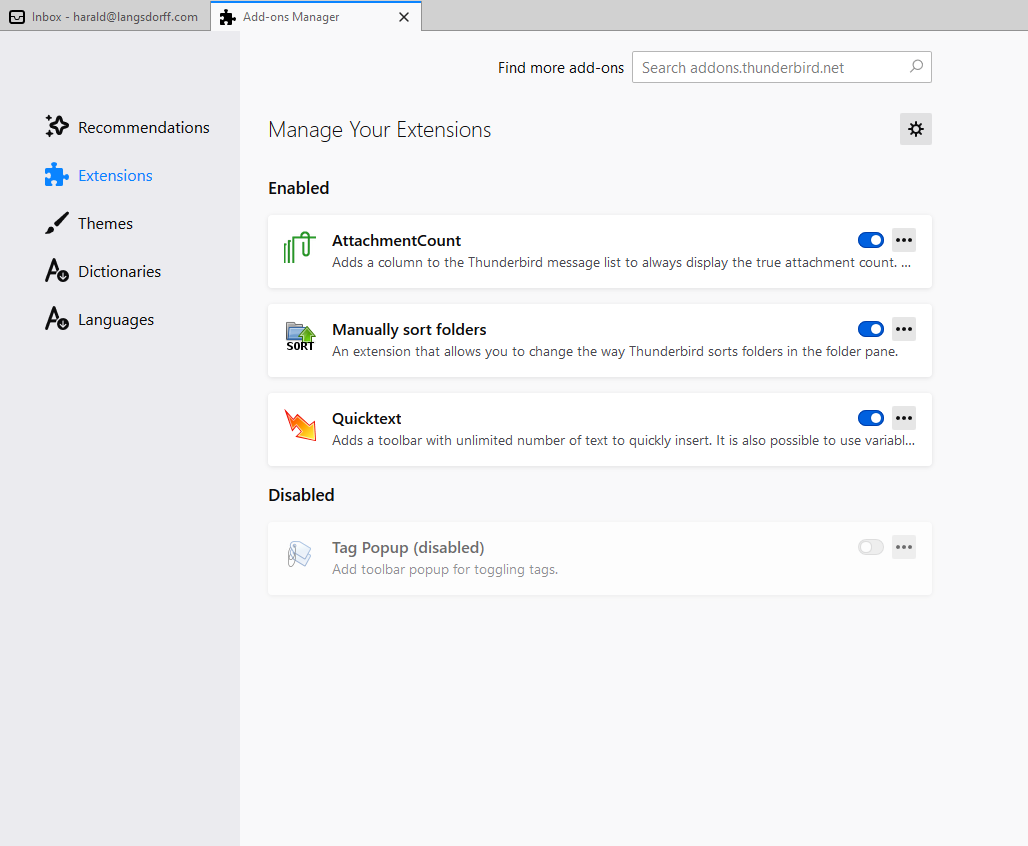
What addons do you have in the Addons > Extensions list ? State whether they are enabled or disabled.
I did try running in safe mode some time ago - it still did the some. Here a pic when they are on. Note: I did not disable them when I run as administrator earlier.