


Cannot get rid of "One Account. All of Google." popup
I have a window popping up titled "One Account. All of Google." that pops up every time I clinck on my gmail Inbox. If I use IMAP for incoming mail there is a failure in receiving emails. Emails are received if I use POP. There is also a failure in outgoing mails through the smtp. I have version 78.6.0 (32-bit) and use Windows 7. I saw the same problem in earlier versions that was apparently solved by an update.
Tüm Yanıtlar (9)

A screenshot would be helpful here.
Hi stans, V.Sboros did not post the image in this question, instead they posted it in another question. I've asked them to post the info in this question to help maintain continuity of the conversation.
here it is
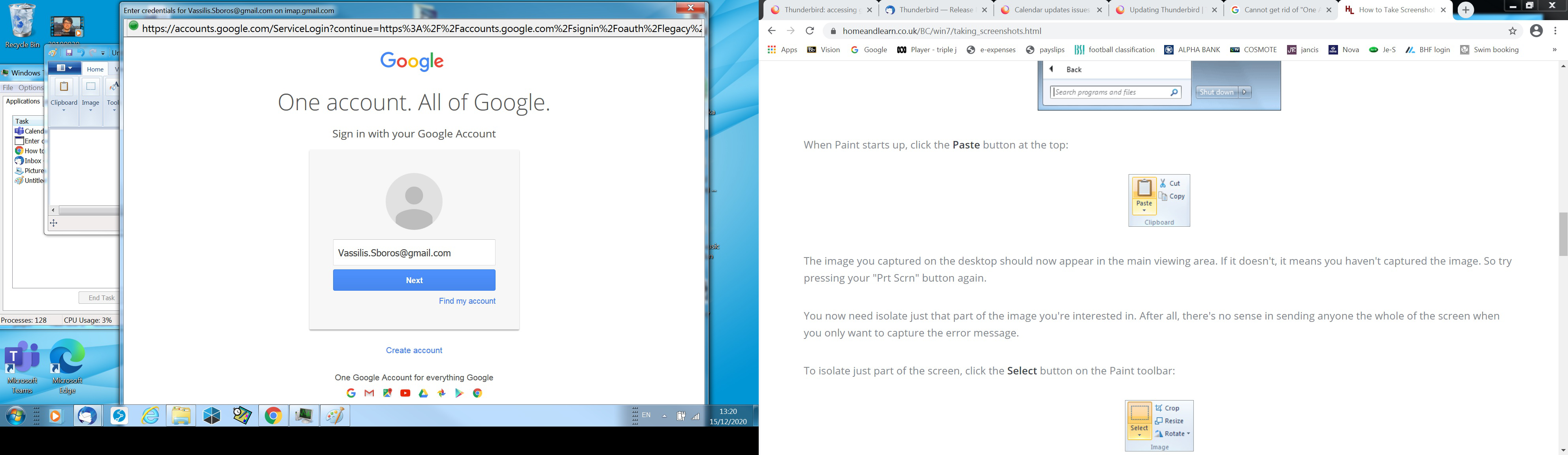
That popup is a Google Accounts webpage asking for your credentials (username and password) for logging in to your Gmail account to allow Thunderbird access to the Gmail IMAP server via OAuth2 authentication. When you see this popup, you're supposed to enter the credentials you're being asked for or else Thunderbird won't be able to log in and access the Gmail IMAP server to access your mailbox. The same OAuth2 method is used for POP, so if you're closing the popup instead of following through with what it's asking of you, then it will keep popping up every time you try to access Gmail via IMAP. The same popup will show up for SMTP authentication to allow access to the outgoing server.
How exactly are you switching between IMAP and POP for the same account in Thunderbird? I hope you're not simply editing the server settings of the same account in Thunderbird.
Stans tarafından tarihinde düzenlendi
The first question is whether I should trust this popup. Are you saying that this is not a bug?
Second, I deleted the account and re-installed it and that is how I chose the POP setting. Still the outgoing emails require this authentication and brings out the popup.
Please confirm that I should put my password in this popup.
thanks
Vassilis
Check my previous reply again, I have added emphasis to the answer you seek.
Can you please confirm that this is not a bug? Please understand that I am not proficient in these things and the window seems a little scruffy to me (to come from Google).
It's not a bug. OAuth2 is the modern way of authenticating with mail servers. This is by design. You should also know that Windows 7 is no longer supported, that is, it has security holes that won't be getting patched/plugged.
Stans is correct. The pop up is not a bug. It is gmail asking if you want to allow Thunderbird to access the server and download emails. So you need to sign in. Your email address has already been added, so check it is the correct one and click on 'Next'. Then it will ask for the password you normally use when you logon to your gmail webmail account and ask you to allow Thunderbird access. Once, this is done, a token is created by gmail and stored in Thunderbird which is then used to allow automatic communication between the gmail server and Thunderbird gmail account.
You can also expect to get an email from gmail with a 'Subject' like 'Security Alert'. It basically says Mozilla Thunderbird Email was granted access to your Google account, if you did not grant the access then you can check the activity - basically gmail says you can stop the access from within your gmail account. However, in this case, you did allow it. So do not be worried if you get one of those 'Security Alert' emails.