


ThunderBird v78.5 32bit Auto Update

I have problems with any programs that run "Automatic Updates" I have just realized that TB v78 has done just that with no option to enable or disable this feature, while I appreciate some prefer the "hands off" approach I like a little more control over my updates as I like to do "backups" before updates get automatically installed!
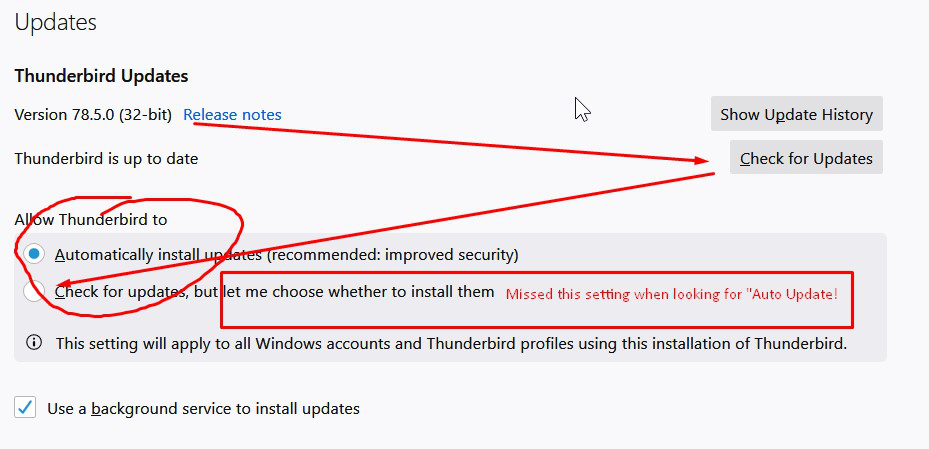
Cut to the chase, 'How do I turn off auto-updates in version 78.5'?
Thanks!
Tüm Yanıtlar (2)
Options/General/Updates, choose 'Check for updates but...'. If you have that and TB is still updating, you probably have another app with a 'software updater' module.
Seçilen çözüm
sfhowes said
Options/General/Updates, choose 'Check for updates but...'. If you have that and TB is still updating, you probably have another app with a 'software updater' module.
Thanks for this, my original TB was turned off, I am not sure when this was turned back on but that was the problem I was having! Kudos @sfhowes
you may check this linked page on: how to disable Thunderbird auto-update, (please upvote Q+A inside that linked page, if its helpful)
atErik tarafından tarihinde düzenlendi