Why the deleted cookies from document.cookie continue to be displayed in the Storage Inspector -> Cookies? How can I delete cookies from there using js?

Hi, I'm trying to delete cookies from document.cookie object and expect to see the same list of cookies under Storage Inspector -> Cookies tab in Dev Tool (F12). But the cookies deleted from document.cookie continue to be displayed in the Storage Inspector -> Cookies tab. Please advise if there is any way to delete cookies from Storage Inspector -> Cookies tab using js? How does tab decide what cookie to display and where does it take them from (document.cookie??) ? Thanks in advance!
Tüm Yanıtlar (2)
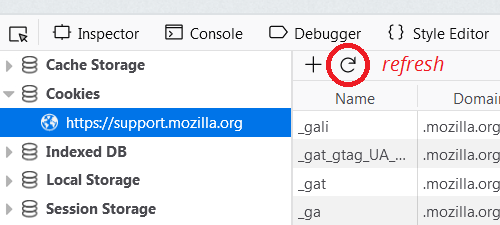
Did you try to reload the Storage Inspector page to update its content?
cor-el said
Did you try to reload the Storage Inspector page to update its content?
I've also noticed that the Storage Inspector panel doesn't always reflect updates automatically. In addition to using the refresh button, you can switch between storage categories to try to update the display.