


How do i get the "View Pocket List" button? It is NOT in my bookmarks menu.

I only have the "save to Pocket"button. Cannot find the View Pocket List anywhere.
Seçilen çözüm
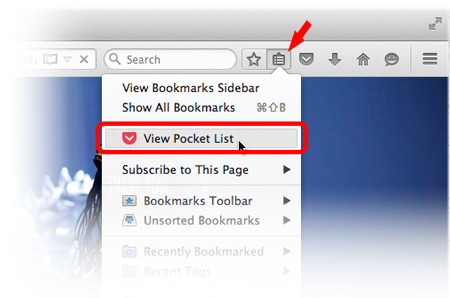
Hello, view pocket button is under bookmarks button. You have to click on the bookmarks list icon. Which will bring you the View Pocket List
Tüm Yanıtlar (6)

Seçilen çözüm
Hello, view pocket button is under bookmarks button. You have to click on the bookmarks list icon. Which will bring you the View Pocket List
I guess I was missing the Bookmarks button. Thanks for sending me in the right direction.
If you can't find your bookmarks buttton, then most probably you have hide it. You can get it back via customize feature. If you aren't familiar with it, see this article: Customize Firefox controls, buttons and toolbars
And after you get into Customize Firefox, you may find the Bookmarks with a star icon under Additional Tools and Features. Place it on the top bar.
Thank you Sashoto!
Note that you may have removed button(s) from the Navigation Toolbar by accident.
If you right-click a toolbar item in normal (non-customize) mode then you can remove this item from the toolbar.
- "Remove from Toolbar" will remove this item from the Navigation Toolbar and moves it to the Customize palette ("3-bar" Firefox menu button > Customize)
- "Move to Menu" will move this item to the "3-bar" Firefox menu button drop-down list
- "Move to Toolbar" in the "3-bar" Firefox menu button drop-down list will move this item to the toolbar
Thank you all. I've got it working now.