


2 different sent folders

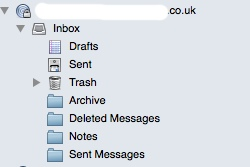
New to Thunderbird (on Mac) and just wondering why I have a "Sent Messages" icon folder as well as a "Sent" normal blue folder. (see screen grab attached). The blue folders can all be subscribed to but the icon folders don't appear in the 'subscribe' list. Account is iMap
Tüm Yanıtlar (4)
Screengrab didn't upload - try again!
Right click the account and select settings. Under copies and folders, check that the sent is actually set to the sent folder on the account.
Thanks for response - yes this is all in order - I just wondered why there is another folder called sent messages? is this a folder set up by my IMAP server or an old local folder?
unfortunately I can not open the image to view it. All I get is he micro thumbnail.
Ohh it is working today.
you have a send and a sent messages folder. You need to set the sent in the account settings to sent messages not sent on that account.
Once done the sent, if empty, will just disappear, I think. Either way, once the icon changes it can be deleted. A restart of Thunderbird might be required to get it all sorted.