


How to untrust specific certificate in firefox?

For example: 1. Certificate "CA.A" is trusted by firefox by default. 2. Certificate "CA.B" is issued by certificate "CA.A", but not stored in firefox by default. 3. Website "WWW.C" use a certificate "CA.C" which is issued by certificate "CA.B" 4. After I visit "WWW.C", firefox will report it is a secure connection and will add "CA.B" to "Certificate Manager".
Now I want to untrust "CA.B" and all certificate issued by it.
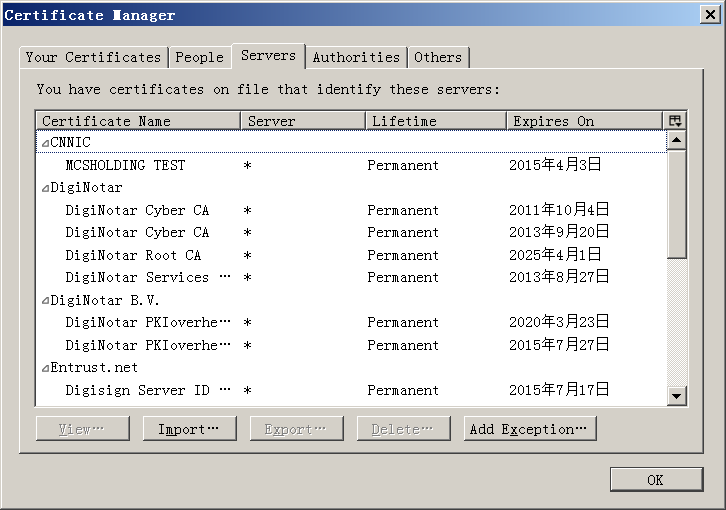
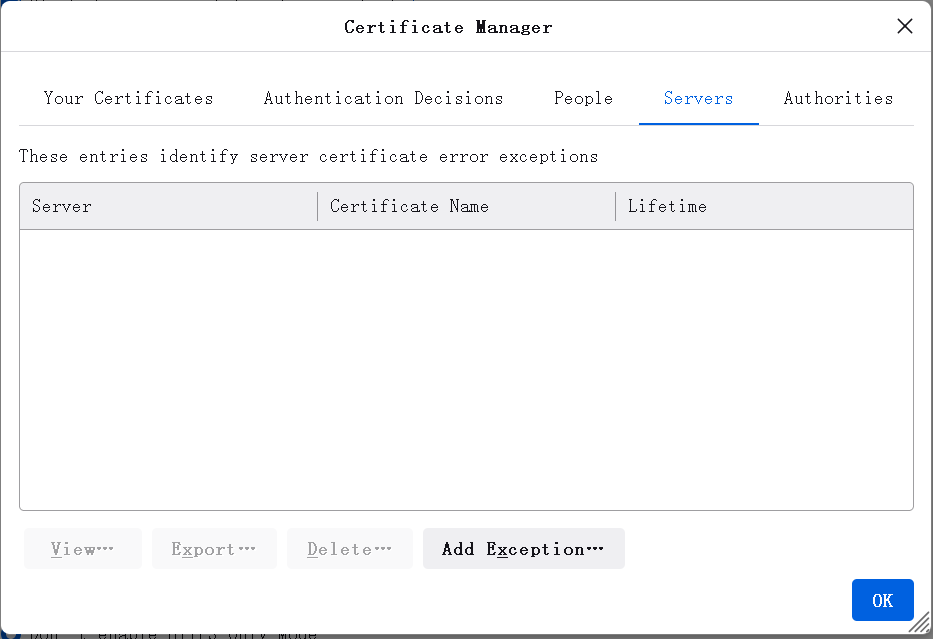
In firefox old release(like firefox 45), there is an "Import" option in "Certificate Manager"->"Servers", I can import "CA.B" to untrust the certificate. In firefox new release(like firefox 112), there is no "Import" option in "Certificate Manager"->"Servers", so I can not untrust "CA.B". I have also try to untrust the certificate in "Certificate Manager"->"Authorities"-"Edit Trust", but uncheck the checkbox can't untrust the certificate and firefox still report it is a secure connection when I visit "WWW.C".
Alla svar (5)

You can (should) only remove/edit trust bits for a root certificate, either a built-in or one you import under "Certificate Manager"->"Authorities" and exceptions also only work for root certificates. If you have a cached intermediate certificate showing under "Authorities" then you should be able to remove it although this works differently in recent releases where Firefox can download all intermediate certificates for all built-in root certificates to prevent issues where the server isn't sending them.
cor-el said
You can (should) only remove/edit trust bits for a root certificate, either a built-in or one you import under "Certificate Manager"->"Authorities" and exceptions also only work for root certificates. If you have a cached intermediate certificate showing under "Authorities" then you should be able to remove it although this works differently in recent releases where Firefox can download all intermediate certificates for all built-in root certificates to prevent issues where the server isn't sending them.
Does "exceptions also only work for root certificates" means that I can't untrust "CA.B" when I trust "CA.A"?
Ändrad av asmreg
Intermediate certificates do not have trust bits set (and never should) as only root certificates can be trusted. The root certificate is the last in the certificate chain that starts with the certificate of the website and ends with the trusted root certificate with possible intermediate certificates in between. If the server send all intermediate certificates then there is no way to block them apart from removing trust bits on the root certificate to break the chain and like I wrote: Firefox 75+ can retrieve intermediate certificates without depending on what the website sends.
cor-el said
Intermediate certificates do not have trust bits set (and never should) as only root certificates can be trusted. The root certificate is the last in the certificate chain that starts with the certificate of the website and ends with the trusted root certificate with possible intermediate certificates in between. If the server send all intermediate certificates then there is no way to block them apart from removing trust bits on the root certificate to break the chain and like I wrote: Firefox 75+ can retrieve intermediate certificates without depending on what the website sends.
Yes, I have tried to import "CA.B" into "Servers" tab, and it does not work as I excepted. But in Windows 7, for example, I can import "Microsoft Azure TLS Issuing CA 06" to "Untrusted Certificates" in certmgr.msc and leave the root certificate "DigiCert Global Root G2" trusted, then Internet Explorer 8 will block "www.microsoft.com". It works as I excepted. So is there any way to make firefox to achieve same function?