


menu bar location

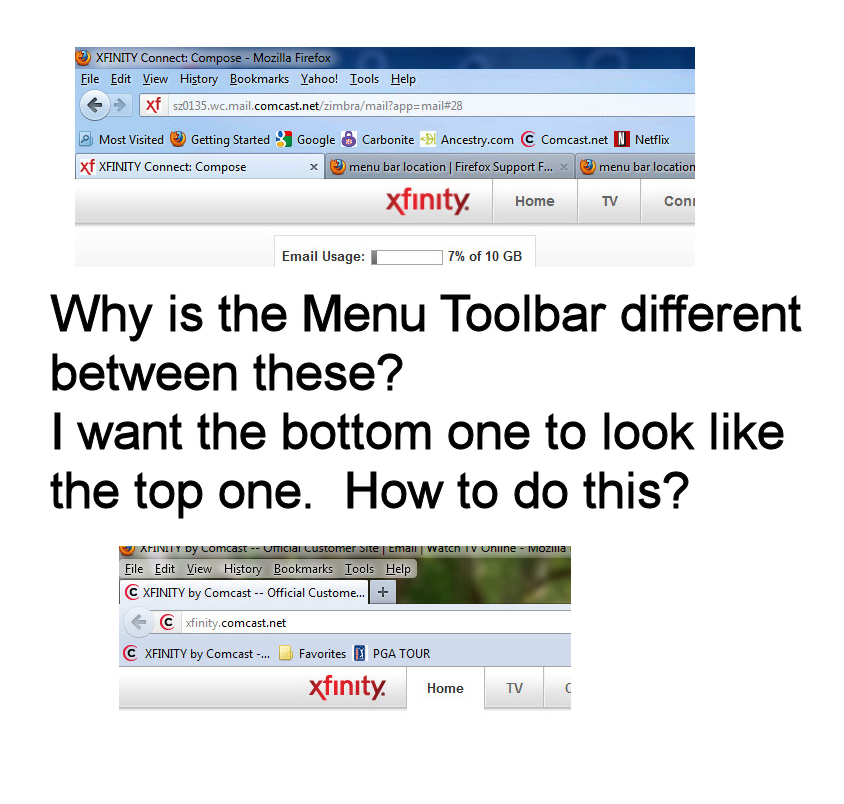
My menu bar is located just above the address bar. I had a friend install Firefox and his Menu bar is at the top of the window all by itsself. How do I get it to the same location as mine.
Сви одговори (5)
Hi,
Please also try right-clicking on the + after the last tab and deselect Menu Bar.
I have tried deselecting it and putting it back. Also restarting Firefox and nothing I have tried has worked. We are both running the same version and both on Win 7.
If it is a theme, you can try to install the same theme. The themes are listed in Tools (Alt + T) > Add-ons > Appearance. If it is userChrome.css, you can try to copy the file and place it in the same directory structure. Can you also attach a screenshot: Add images: Browse below Post a Reply on this page.
Here is an image showing the difference between the two computers.
You can also try to right-click on the + after the last tab and Tabs on Top. If it's the Yahoo menu entry I'm not sure. It may have been inserted by a Yahoo product.