


Windows 10 reached EOS (end of support) on October 14, 2025. If you are on Windows 10, see this article.

Претражи подршку

Избегните преваре подршке. Никада од вас нећемо тражити да зовете или шаљете поруке на број или да делите личне податке. Пријавите сумњиве радње преко „Пријавите злоупотребу” опције.

Сазнај више
Архивирано

Quantities in inbox do not match what is displayed

cor-el одговорено
wayne69

How do I change the display of the number of emails in the folder to just the ones unread? If I double-click on the folder it displays what I want, but I want it to stay displaying the unread number only. I need this so at a quick glance I can tell if new emails are in those Inboxes.

See the mailbox shows 194 (194 what?) doesn't allow me to determine that I have 1 or 2 new emails that had come in so I have to open up the mailbox each time to verify if any new emails had arrived. Also, there are only 27 emails in that mailbox so why is there a discrepancy between the 194 listed, the 27 that are actually there, and the 7 that are unread?
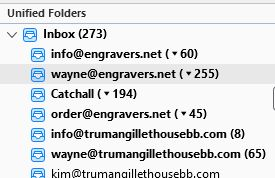
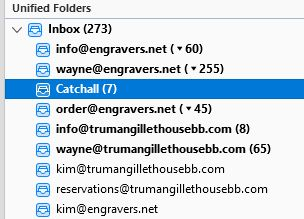
How do I change the display of the number of emails in the folder to just the ones unread? If I double-click on the folder it displays what I want, but I want it to stay displaying the unread number only. I need this so at a quick glance I can tell if new emails are in those Inboxes. See the mailbox shows 194 (194 what?) doesn't allow me to determine that I have 1 or 2 new emails that had come in so I have to open up the mailbox each time to verify if any new emails had arrived. Also, there are only 27 emails in that mailbox so why is there a discrepancy between the 194 listed, the 27 that are actually there, and the 7 that are unread?
Приложени снимци екрана

Сви одговори (1)

Is this a question about Thunderbird or about Firefox ?

If the question is about Thunderbird then we can move the question thread to Thunderbird Support.