


What is the bar that appears at the top of pages and how do I get rid of it?

Whenever a page is showing on the screen, a bar appears at the top of the page with a lot of squares ending with a square that says "diagnose." It sometimes causes a printing problem when the document prints out so small that you can't read it.
Izbrana rešitev
That seems to have done it. Thanks!!!!!
Preberite ta odgovor v kontekstu 👍 0Vsi odgovori (7)
It sounds like some kind of advertising. Often behaviors that affect multiple sites are caused by an add-on, particularly an extension. You may want to review your extensions on the following page and disable ALL nonessential extensions.
orange Firefox button or classic Tools menu > Add-ons > Extensions category
After restarting Firefox, is the bar gone?
Can you attach a screenshot?
- http://en.wikipedia.org/wiki/Screenshot
- https://support.mozilla.org/kb/how-do-i-create-screenshot-my-problem
Use a compressed image type like PNG or JPG to save the screenshot.
The "screenshot" is attached.
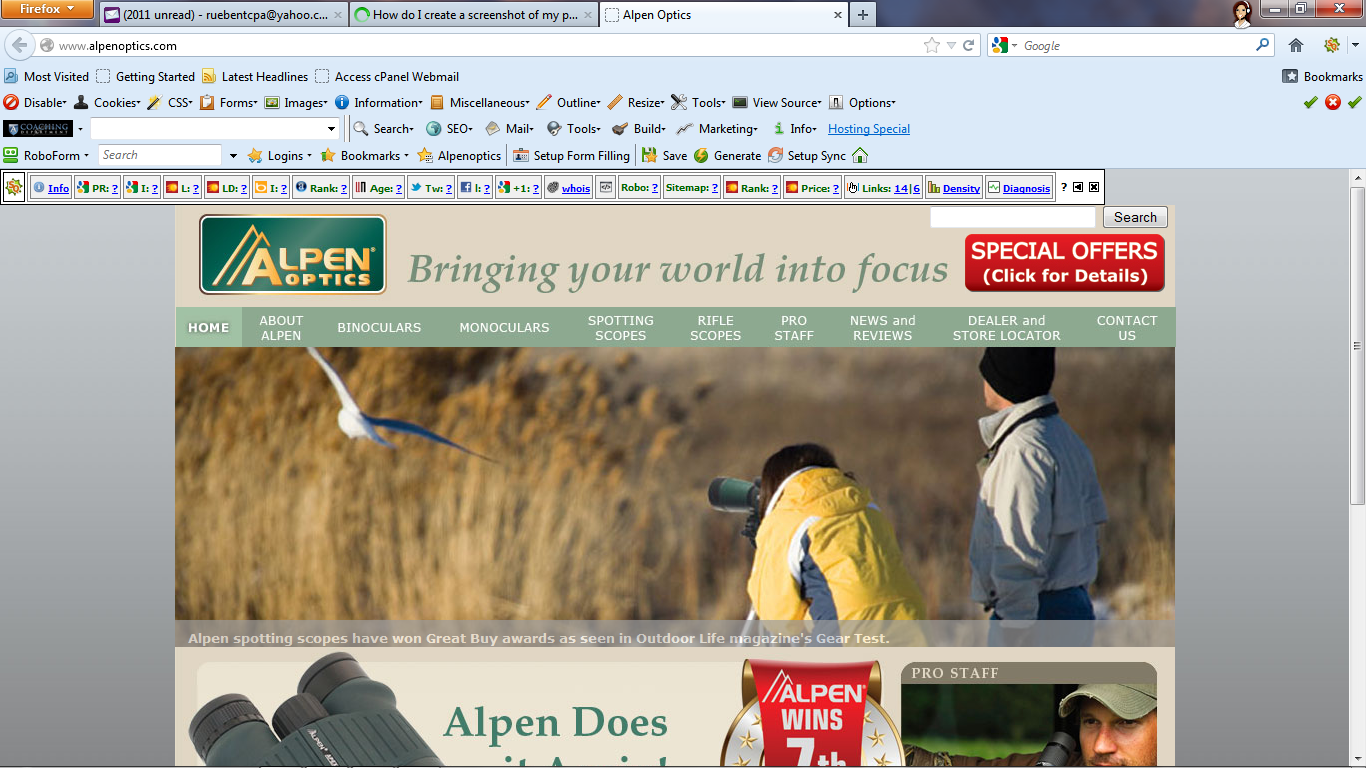
It's the SEOquake mini-bar from http://www.seoquake.com/
Edit: Or an imitator...
Spremenil jscher2000 - Support Volunteer
How do I get rid of it or do I really want to?
It's an extension. Please see my earlier post about disabling unwanted extensions.
Izbrana rešitev
That seems to have done it. Thanks!!!!!