


How do I make the fonts bigger and save it forever!!!

I ant to make the fonts bigger on all web pages and I do not want to have to zoom each time I do it!!!
Vsi odgovori (3)
There are a couple of add-ons designed to save your zoom settings as the default for all sites. I haven't tried them, but here they are:
Does that help?
ok so u download these thing but you STILL have to keep making the font bigger on the pages.
Each is supposed to let you set a default (global) zoom level so you don't have to tweak every site. Can you find the setting?
---
In NoSquint, click the % on the Add-on Bar to call up site preferences, then click the Global Settings button, then the Zooming tab.
If you don't have the Add-on Bar displayed, you can right-click the new tab button ("+") or a blank area of the tab bar to the right of it and choose Add-on Bar from the shortcut menu.
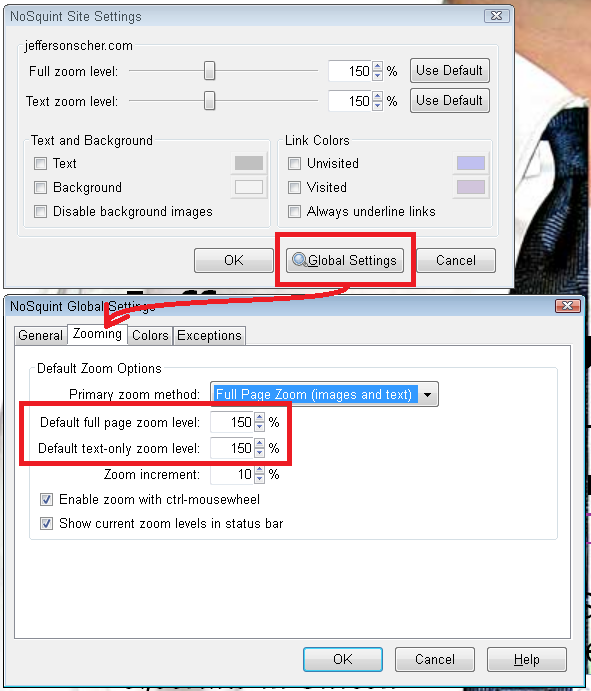
Spremenil jscher2000 - Support Volunteer