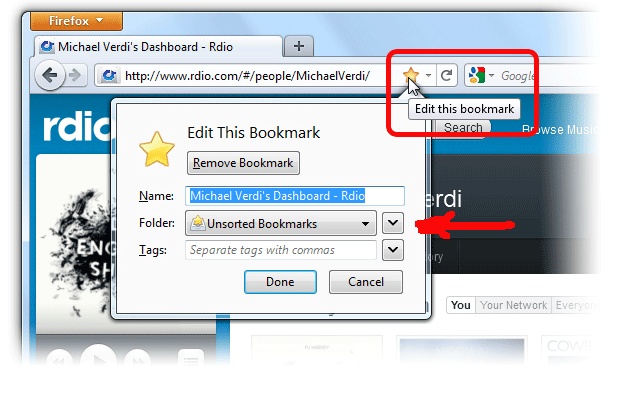
Upgraded to Firefox 4.0 Can see and use all old bookmarks folders and bookmarks, but cannot see any of the old folders when I attempt to bookmark a new page- only see Bookmarks toolbar & Menu and unsorted bookmarks

Had several bookmarks folders under old Firefox. After upgrade to 4.0 all of these still work via bookmarks menu. Problem is, when I attempt to bookmark a new page and place it in one of my existing bookmarks folders with 4.0, the only folders that Firefox can see are the bookmarks toolbar, bookmarks menu, and unsorted bookmarks. How do I get Firefox to see the old folders so that I can continue to put bokmarked pages in them??
Had several bookmarks folders under old Firefox. After upgrade to 4.0 all of these still work via bookmarks menu. Problem is, when I attempt to bookmark a new page and place it in one of my existing bookmarks folders with 4.0, the only folders that Firefox can see are the bookmarks toolbar, bookmarks menu, and unsorted bookmarks. How do I get Firefox to see the old folders so that I can continue to put bokmarked pages in them??
Vsi odgovori (1)
In the "Edit this Bookmark" window, use the 2nd drop-down button, that is to the right of the "Folder", to open a larger window that will allow more folder to appear. See the sloppy red arrow on the screenshot below.