


Windows 10 reached EOS (end of support) on October 14, 2025. For more information, see this article.

Iskanje po podpori

Izogibajte se prevarantski tehnični podpori. Nikoli vam ne bomo naročili, da pokličete telefonsko številko ali nam pošljete osebne podatke. Sumljivo dejavnost prijavite z gumbom »Prijavi zlorabo«.

Več o tem

"Find" highlighted text background is really tough for this color blind person.

  • 1 odgovor
  • 0 ima to težavo
  • 22 ogledov
  • Zadnji odgovor od TyDraniu

več možnosti

Doing a "find" ends up showing a greenish (so I'm told) background with white text. Want to guess which "find" in the attached image is difficult for me to find?

What I would like: Find (focus): yellow text on black background Find All: white text on black background

Yes, of course it would be nice if that would auto switch to black on yellow if the website default is black background.

I can hack userContent.css and get the selection function to work:

/* General highlight (for text selection, etc.) */

selection {
   background: #FFFF00 !important;  /* Yellow background */
   color: #000000 !important;       /* Black text */

}

I can hack userContent.css and get the Find All (sans the focus) to work.

But firefox always provides the focus with white on green. Even if I do something like this:

/* Customize the color of highlighted search text */ input[type="search"]:focus::selection {

   background: #FFFF00 !important;  /* Yellow background */
   color: #000000 !important;       /* Black text */

}

I tried several themes. No change. I tried changing Windows Preferences. No change.

There must be a way to make this "find" feature useful for me.
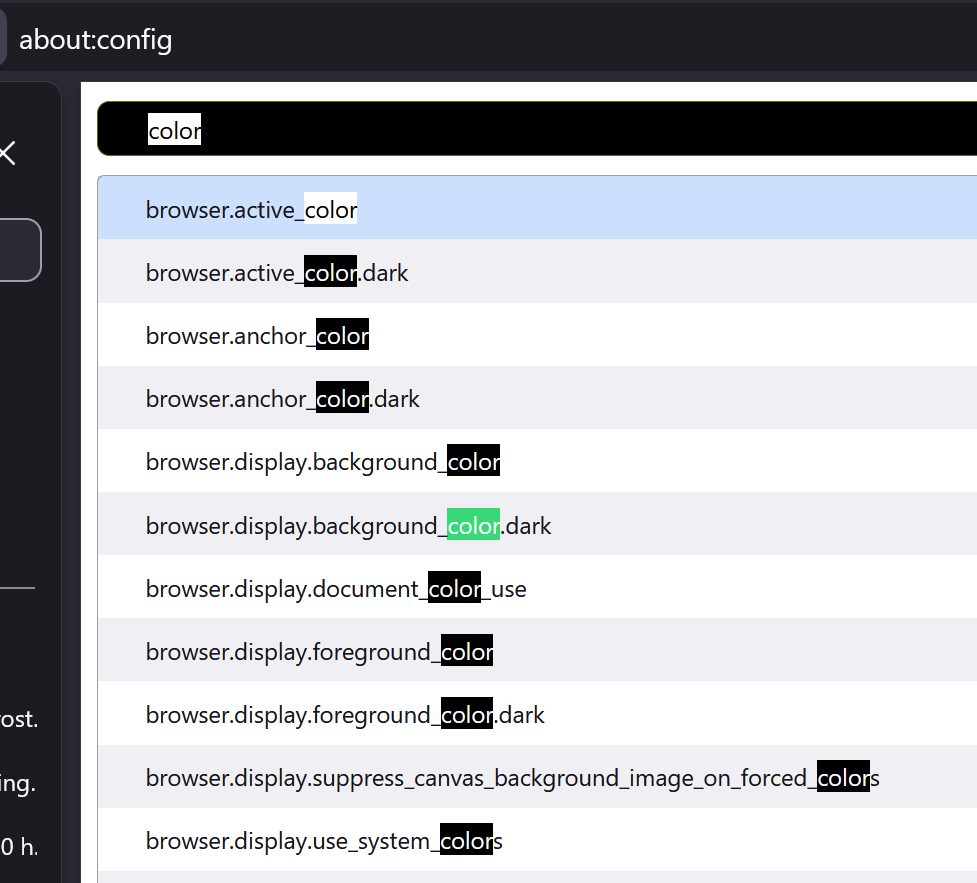
Doing a "find" ends up showing a greenish (so I'm told) background with white text. Want to guess which "find" in the attached image is difficult for me to find? What I would like: Find (focus): yellow text on black background Find All: white text on black background Yes, of course it would be nice if that would auto switch to black on yellow if the website default is black background. I can hack userContent.css and get the selection function to work: /* General highlight (for text selection, etc.) */ ::selection { background: #FFFF00 !important; /* Yellow background */ color: #000000 !important; /* Black text */ } I can hack userContent.css and get the Find All (sans the focus) to work. But firefox always provides the focus with white on green. Even if I do something like this: /* Customize the color of highlighted search text */ input[type="search"]:focus::selection { background: #FFFF00 !important; /* Yellow background */ color: #000000 !important; /* Black text */ } I tried several themes. No change. I tried changing Windows Preferences. No change. There must be a way to make this "find" feature useful for me.
Priloženi posnetki zaslona

Vsi odgovori (1)

več možnosti

Go to about:config and type ui.text in the Search preference name textbox. It should give you 5 preferences that you can experiment with.

Spremenil TyDraniu

Vprašajte

Če želite objaviti odgovor, se morate prijaviti v svoj ​​račun. Če računa še nimate, zastavite novo vprašanje.