


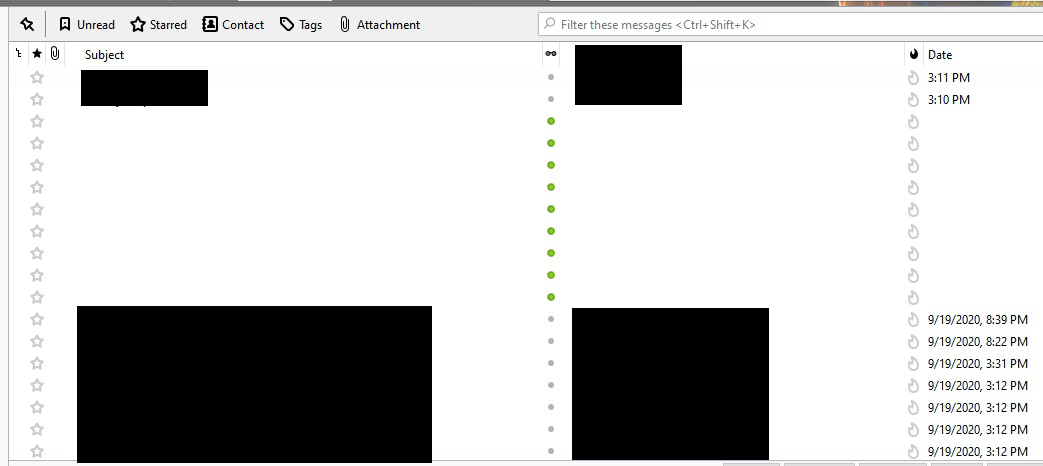
Message information (Subject, corespondents, date) not shown for unread messages

All messages appear normally except for unread messages. Message information (Subject, corespondents, date) is not shown for unread messages. When I click on an unread message, the invisible information appears as normal.
Izbrana rešitev
To test for a broken layout, launch in safe mode (hold Shift when starting TB). Any difference?
Vsi odgovori (5)
try right clicking the folder, selecting properties and then the repair button. This rebuilds the index used to populate those mail lists.
Thanks. Yea, tried that. It didn't do anything.
Izbrana rešitev
To test for a broken layout, launch in safe mode (hold Shift when starting TB). Any difference?
Thanks. I Disabled add-ons and reset toolbars and controls. Then I continued to Safe Mode. Now it appears fixed. The Subject now appears normally. I also noticed a change in the Background image whereas it changed to a generic Windows Background. Sometime when I installed TB, I remember changing the background image to a dark TB style image. I restarted again using Disable add-ons and Reset toolbars and controls, and clicked on Make Changes and Restart. Dark background appeared again. Now I'll wait and see what happens when I get a new message.
Everything appears OK now. Thank you all!