


Unable to select Firefox as default browser Windows 8.1, to open messages in Thunderbird
System suddenly changed IE to default browser for Thunderbird messages. Going through Settings, Defaults, Firefox is not an option, the icon is not there. The main issue is Thunderbird now opens messages in IE all of a sudden instead of Firefox. In Firefox Options, I click on set default and it comes up with IE or search store for an app. I'd be grateful for any help.
Vsi odgovori (13)

Thank you but I have Windows 8.1 - no Microsoft Edge. Do you have any other suggestions?
Try out the links anyway.
I've tried the links, they don't work. There is no option to selecte Firefox browser as default - the icon has disappeared - anyone else have this problem?
Spremenil Sidah
1.Open the PC Settings application (press and release the Windows Start button, then click the gear icon).
   2.Select Search and apps from the sidebar.
   3.Select Defaults from the sidebar.
   4.In the Set Default Programs window, select Firefox from the list of programs on the left and click Set this program as default.
Thank you, there is no option to select Firefox, ie, for some reason the default option has disappeared for some unknown reason. This is the problem.
Open the PC Settings application (press and release the Windows Start button, then click the gear icon).
   Select Search and apps from the sidebar.
   Select Defaults from the sidebar.
   In the Set Default Programs window, select Firefox from the list of programs on the left and click Set this program as default.
https://support.mozilla.org/en-US/kb/setting-firefox-default-browser-does-not-work
Hi Sidah, sorry about the weird replies recently.
When you say "the default browser for Thunderbird messages," what do you mean? For example:
- To open http:// and https:// links in messages in Thunderbird
- To open saved message files (for example, .eml files)
- Something else
Hi there, To open http:// and https:// links in messages in Thunderbird
The links were previously opening in Firefox which is my preference, and one day they just opened in IE. I've been through the change default browser data but the problem is that I can't see Firefox as an option to choose. In Firefox options for example, when I try to choose Firefox as the default, a message will appear asking me to choose an App from the Store.
I'm on auto update with Thunderbird and I'm not sure if settings were changed with the update?
Many thanks for your time Sidah
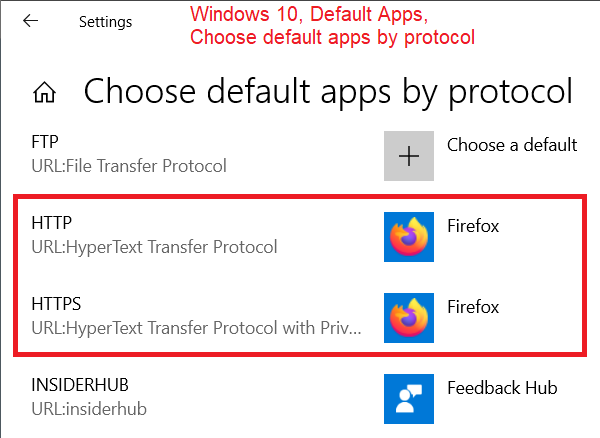
Is Firefox also missing from the list "by protocol"? I think this was similar in Windows 8/8.1 as it is in Windows 10:

FredMcD said
See if these links help (Win 10) https://support.mozilla.org/en-US/questions/1207775 https://support.mozilla.org/en-US/questions/1208759#answer-1086882 https://support.mozilla.org/en-US/kb/how-change-your-default-browser-windows-10 https://www.bing.com/search?q=change+default+browser+windows+10
dnload windows 8.1
And . . .