

Ta tema je arhivirana.
Postavite prosim novo vprašanje, če potrebujete pomoč.

Rešeno
Arhivirano
How can I change the display settings of a web page?

My home page is www.newyorktimes.com. It does not fill the monitor using firefox as the browser. The font is also too small and is not clear. Using Google Chrome this website displays properly. It also seems that most other websites fill the monitor and display properly on Firefox. ???
My home page is www.newyorktimes.com. It does not fill the monitor using firefox as the browser. The font is also too small and is not clear. Using Google Chrome this website displays properly. It also seems that most other websites fill the monitor and display properly on Firefox. ???
Vsi odgovori (2)
Izbrana rešitev
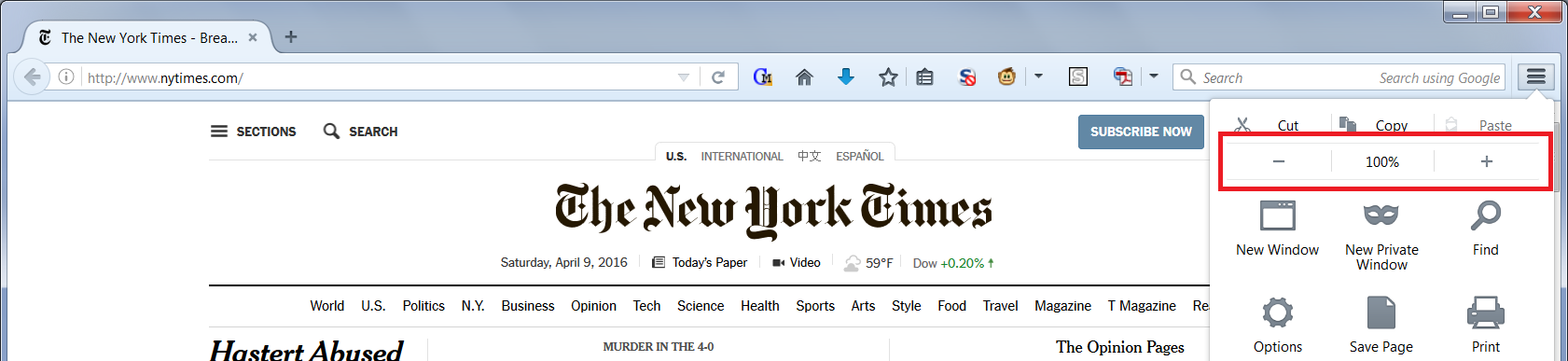
Could I suggest using zoom? The NYT site uses a fixed-width layout, so it should zoom proportionally. You can use either:
- keyboard shortcuts: Ctrl+ to enlarge, Ctrl- to reduce
- menu (see attached screen shot)
Firefox should remember that as long as you do not clear "Site Preferences" at shutdown.
Thank you. That worked perfectly and so simple.