

Ta tema je arhivirana.
Postavite prosim novo vprašanje, če potrebujete pomoč.

Arhivirano
firefox has started opening links in a new tab instead of the existing tab.

its started doing this whilst i was browsing the internet. when i try to open a new link i stay n the current page and the new link opens in a new tab
its started doing this whilst i was browsing the internet. when i try to open a new link i stay n the current page and the new link opens in a new tab
Vsi odgovori (2)
Hi danimoore,
Depending opon your operating system, you should be able to adjust this setting in your Firefox Preferences.
You can find the options in your settings under "Tabs" that allow you to adjust these to your liking. I've attached a screenshot that displays what preferences you can change them to.
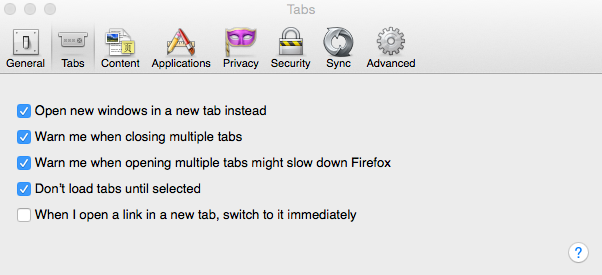
Spremenil avjanian
Start Firefox in Safe Mode to check if one of the extensions (Firefox/Tools > Add-ons > Extensions) or if hardware acceleration is causing the problem.
- Switch to the DEFAULT theme: Firefox/Tools > Add-ons > Appearance
- Do NOT click the Reset button on the Safe Mode start window