


Video bug green line

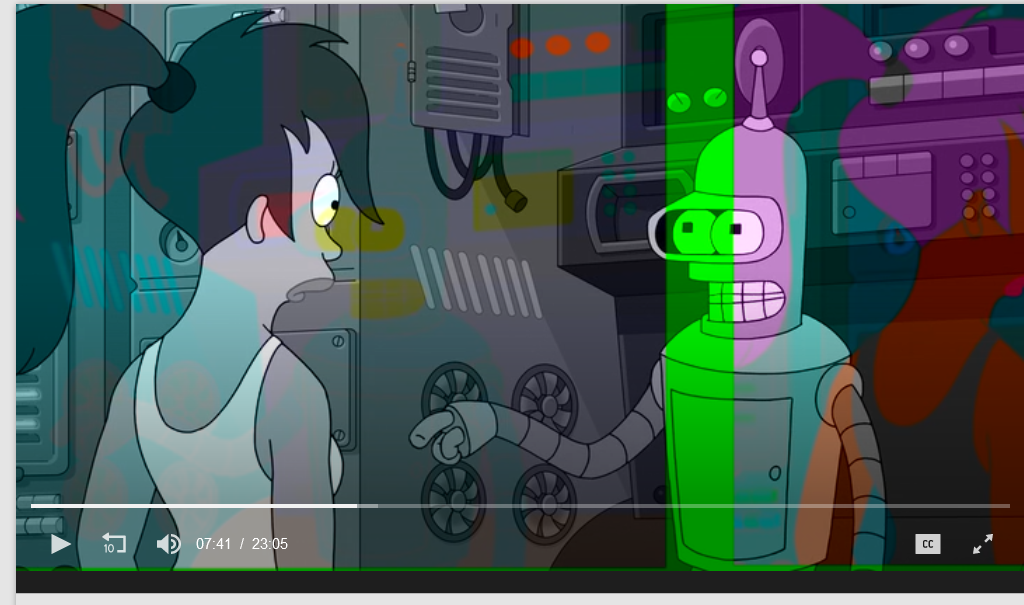
When I try to watch video on YouTube or other places. I encounter green line and reverse picture. I have reinstall Firefox but it still persist. Can someone please help me understand how to fix it. As the video bug only happens in firefox. And not in other browsers such as brave or edge. i also se that other people have the samme issue exampel https://support.mozilla.org/en-US/questions/1429053.
Vybrané riešenie
You can check if there is an update for your graphics display driver and check for hardware acceleration related issues.
You can try to disable hardware acceleration in Firefox.
- Settings -> General -> Performance
remove checkmark: [ ] "Use recommended performance settings"
remove checkmark: [ ] "Use hardware acceleration when available" - https://support.mozilla.org/en-US/kb/performance-settings
Close and restart Firefox after modifying the setting to apply changes.
Čítať túto odpoveď v kontexte 👍 0Všetky odpovede (2)
Vybrané riešenie
You can check if there is an update for your graphics display driver and check for hardware acceleration related issues.
You can try to disable hardware acceleration in Firefox.
- Settings -> General -> Performance
remove checkmark: [ ] "Use recommended performance settings"
remove checkmark: [ ] "Use hardware acceleration when available" - https://support.mozilla.org/en-US/kb/performance-settings
Close and restart Firefox after modifying the setting to apply changes.
You can keep hardware acceleration enabled and instead only disable it for video by changing media.hardware-video-decoding.enabled to false in about:config then restart the browser.