


Windows 10 reached EOS (end of support) on October 14, 2025. If you are on Windows 10, see this article.

Mozilla 도움말 검색

고객 지원 사기를 피하세요. 저희는 여러분께 절대로 전화를 걸거나 문자를 보내거나 개인 정보를 공유하도록 요청하지 않습니다. "악용 사례 신고"옵션을 사용하여 의심스러운 활동을 신고해 주세요.

자세히 살펴보기
이 쓰레드는 잠기고 보존되었습니다. 만약 도움이 필요하시면 새로운 질문을 올려주세요.
잠김 보존

Numerous issues with Thunderbird v102.1.1 (64-bit) on macOS 12.5

Wayne Mery replied
SuMo Bot

After upgrading Thunderbird to version 102.1.1 I am now unable to send email from any account or identity that doesn't have end-to-end encryption configured for it. I only use end-to-end encryption for one of my identities in one of my accounts.

Since the upgrade I now see a message any time I try to send an email from one of my accounts that does not use ETE encryption that says "OpenPGP Alert - Cannot digitall sign this message, because you haven't yet configured end-to-end encryption for <sender email address here>"

For the accounts that do not have ETE encryption configured, there are no keys, no values in the S/MIME Personal certificate for digital signing or encryption, Default settings for sending messages; all options are greyed out and are not selectable, same with Advanced settings.

Additionally, when in the message composition window, all of the menu items under the "Security" menu are greyed out. OpenPGP is checked and all others are unchecked. (I haven't been able to successfully get a screen shot with the pulldown window open)

In the composition window, the "Use end-to-end encryption" and "View or change OpenPGP encryption settings" buttons are greyed out (see attached image)

It appears that I am able to reply-to or forward emails from accounts/identities that have no ETE configured but I am unable to compose a new mail from any of those accounts/identities.


Please let me know if I can provide any additional information.

any and all assistance is greatly appreciated.
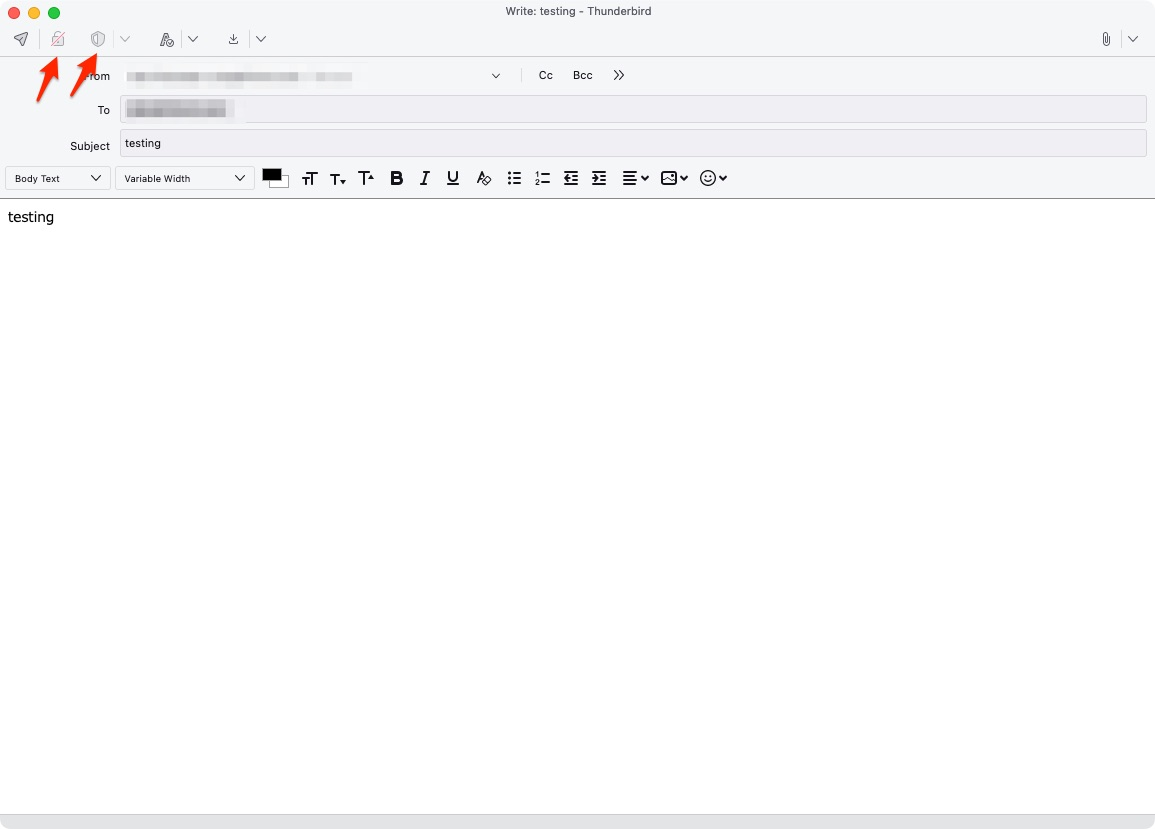
After upgrading Thunderbird to version 102.1.1 I am now unable to send email from any account or identity that doesn't have end-to-end encryption configured for it. I only use end-to-end encryption for one of my identities in one of my accounts. Since the upgrade I now see a message any time I try to send an email from one of my accounts that does not use ETE encryption that says "OpenPGP Alert - Cannot digitall sign this message, because you haven't yet configured end-to-end encryption for <sender email address here>" For the accounts that do not have ETE encryption configured, there are no keys, no values in the S/MIME Personal certificate for digital signing or encryption, Default settings for sending messages; all options are greyed out and are not selectable, same with Advanced settings. Additionally, when in the message composition window, all of the menu items under the "Security" menu are greyed out. OpenPGP is checked and all others are unchecked. (I haven't been able to successfully get a screen shot with the pulldown window open) In the composition window, the "Use end-to-end encryption" and "View or change OpenPGP encryption settings" buttons are greyed out (see attached image) It appears that I am able to reply-to or forward emails from accounts/identities that have no ETE configured but I am unable to compose a new mail from any of those accounts/identities. Please let me know if I can provide any additional information. any and all assistance is greatly appreciated.

모든 댓글 (1)

If you don't figure it out here, then post in https://thunderbird.topicbox.com/groups/e2ee

This question has been locked because the original author has deleted their account. While you can no longer post new replies, the existing content remains available for reference.