


Unable to log out of Twitter. I get '403 Forbidden: The server understood the request, but is refusing to fulfill it.'

When I try to log out of Twitter I get the error message below.
403 Forbidden: The server understood the request, but is refusing to fulfill it.
Seems to have come about since I last updated Firefox... I think...
Összes válasz (3)
Kiválasztott megoldás
You can manually log out of Twitter by deleting cookies from twitter. Click on "Firefox" in the top-left, then chose "Options". Click on the "Privacy" tab and click on "remove individual cookies". In the list, scroll down to twitter.com and click "Remove Cookies" I hope this helps. As for the 403 error, this is usually caused by a typo in the address bar, or with outage on the Twitter servers.
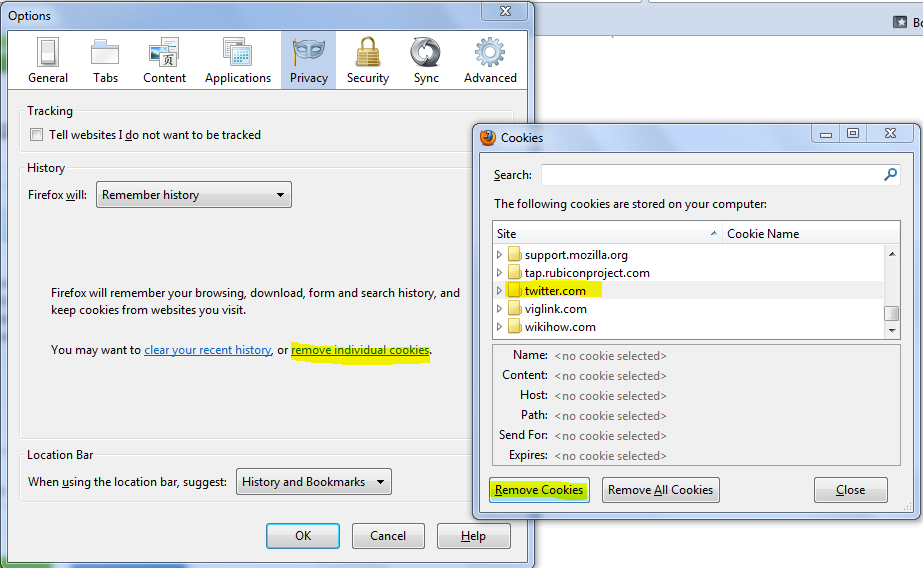
Clear the cache and the cookies from sites that cause problems.
"Clear the Cache":
- Tools > Options > Advanced > Network > Offline Storage (Cache): "Clear Now"
"Remove Cookies" from sites causing problems:
- Tools > Options > Privacy > Cookies: "Show Cookies"
Thanks for the replies :o) Removing the Twitter cookie seems to have done the trick (fingers crossed it will stay that way). I didn't know there was a way of removing individual cookies until now. Thanks again!