


Audio is completely disabled in Firefox but i can listen when i use Chrome. i have updated all my add-ons but still having problem.

audio disabled, not able to listen to any audio website, I have updated the Add-ons and i am using the latest beta version of Firefox.
Módosította: NoahSUMO,
Összes válasz (3)
Hi rumesh02,
It could be a couple of things. You might have accidentally muted audio for Firefox. The article Knowledge Base article What to do if Firefox won't play any sounds will show you how to check.
If that doesn't work, you should look at Fix common audio and video issues. This will show you how to troubleshoot any plugin/extension issues that might be impacting your system.
Hopefully this helps!
Kiválasztott megoldás
Please read this article:
What to do if Firefox won't play any sounds
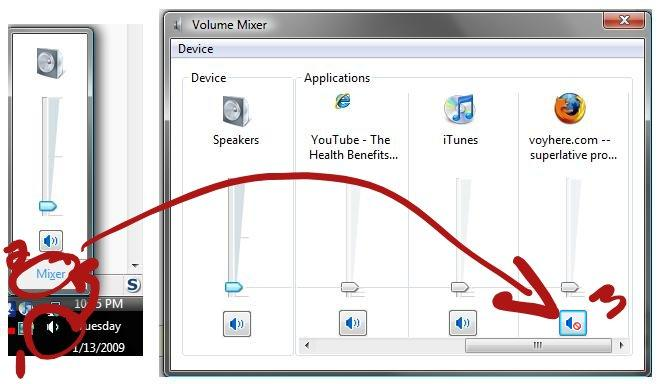
Look under the Unmute Firefox section. I don't know why but Windows 7 and Vista have this weird idea of messing with Firefox sounds and somehow Firefox gets muted.
Make sure volume slider is not at the bottom and that the speaker icon under Firefox doesn't have a muted symbol on it. If you see the mute symbol, click the speaker icon to unmute it.
Screenshot:

Thanks a ton it worked.