


Invalid Certificate from FireFox

When using Firefox I get the following invalid security certificate message: static-ssl-cdn.addons.mozilla.net;443 uses an invalid security certificate. The certificate is not trusted because no issue chain was provided. Error code: sec_error_unknow_issuer
Is this a firefox issue? or the certificate you generate?
I do get the pop up panel indicating a "dangerous website" and accept the certificate exception. But then I get the above message. Lizette
Összes válasz (5)
Hi,
Please check if DigiCert Inc. which comes with a standard Firefox installation is listed in Tools (Alt + T) > Options > Advanced > Encryption > View Certificates > Authorities.
...............................................................................................................................
Useful links:
Going beyond Tools > Options - about:config
Page Info Tools (Alt + T) > Page Info, Right-click > View Page Info
Firefox Profile Folder & Files
Yes, the DigiCert Inc is in the list.
Lizette
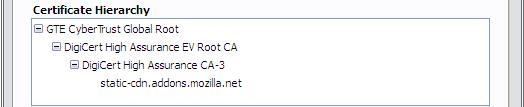
I've attached a screenshot. Is it the same in the Add Exception... > View > Details, Certificate Hierarchy (chain)? If When an OSCP server connection,... is enabled in Tools (Alt + T) > Options > Advanced > Encryption > Validation, this error may be temporary. The error may also happen if you are connecting through a proxy or a security software that connects on behalf of the browser. If possible you should also try to update Firefox. I think version 5.0 is no longer officially maintained.
Módosította: Vivek,
Who is the issuer of that certificate?
I see a different certificate chain for that specific domain (Akamai Subordinate CA 3 -> GTE CyberTrust Global Root), so they may be using more servers for load balancing and you may get a different server.
You can retrieve the certificate and check details like who issued certificates and expiration dates of certificates.
- Click the link at the bottom of the error page: "I Understand the Risks"
Let Firefox retrieve the certificate: "Add Exception" -> "Get Certificate".
- Click the "View..." button and inspect the certificate and check who is the issuer.
You can see more Details like intermediate certificates that are used in the Details pane.