


See PDF attachments without saving the file

Until a couple of weeks ago, I click on the attachment and the Adobe program will open the file and after that I decided if want to save the file. Now, when I click on the attachment, I get the "Save file" screen. then I have to open Adobe and go to where the file was saved to see the attachment.
How can I see an attachment without saving it?
Összes válasz (7)
Open Adobe Reader, go to Edit, then Preferences. In the menu which appears, click the link to "Internet" and then in the right hand pane, remove the checkmark from "Display PDF in browser". See screenshot.
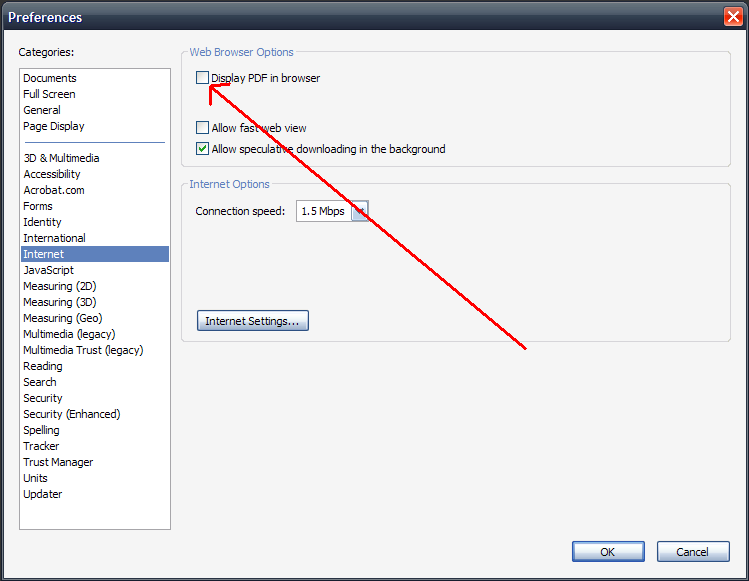
I uncheck the boxes ( Adobe/edit/preferences/ Display PDF and Allow fast ), reboot the PC and still see the "Save screen" when I download an attachment.
any other idea?
THANKS
Where is the attachment? In an webmail email? If so, which webmail client are you using?
I work with mail.yahoo.com or ATT.net. I checked the mail configuration screen and I did not see anything related to download an attachment.
Thanks
Have you checked Application setting for PDF in Firefox? See https://support.mozilla.com/en-US/kb/Managing%20file%20types
Update your Java: Installing or Updating Java
A bit outside my usual area but Options>Applications>Click on Adobe Acrobat entries>Select Use Adobe Acrobat (In Firefox) if not already showing.
THANKS.
here is what I did Firefox/tools/Options/applications/ left Adobe right Adobe.
THANKS again