


Thunderbird keyboard shortcut for mark message read/unread doesn't work.
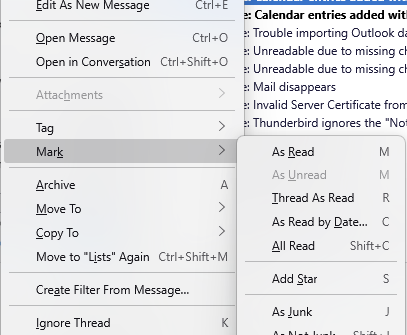
The keyboard shortcut to mark a message as read or mark it as unread is "M". On Windoze (11) the Ctrl key is supposed to be the keyboard shortcut activator, but when I type Ctrl+m (lowercase) a new message window pops up.
If I use Ctrl+M (capital M) the message disappears. I'm not sure where it goes, I didn't see it in the Trash, however Ctrl+z (lowercase) restores the message to the message list.
I searched Thunderbird settings to see how to modify or create keyboard shortcuts, but shortcut and keyboard gave zero results.
How do I restore or set Ctrl+m to mark messages read/unread? (I did not modify any keyboard shortcut.)
Összes válasz (1)
There is no capacity to change Thunderbird shortcuts.
Ctrl+M is a new message and has been for about 15 years, perhaps always. ALt+M is the message menu
Simply pressing the unadorned M key when a message is selected in the list toggle the read / unread status as advertised.
Phil Reinie said
If I use Ctrl+M (capital M) the message disappears. I'm not sure where it goes
So that would be Ctrl+shift+ M or Move/Copy message to previous target folder Again
I didn't see it in the Trash, however Ctrl+z (lowercase) restores the message to the message list.
That would be undo.
Please see https://support.mozilla.org/en-US/kb/keyboard-shortcuts-thunderbird