Windows 10 reached EOS (end of support) on October 14, 2025. If you are on Windows 10, see this article.

Támogatás keresése

Kerülje el a támogatási csalásokat. Sosem kérjük arra, hogy hívjon fel egy telefonszámot vagy osszon meg személyes információkat. Jelentse a gyanús tevékenységeket a „Visszaélés bejelentése” lehetőséggel.

További tudnivalók
A témacsoportot lezárták és archiválták. Tegyen fel új kérdést, ha segítségre van szüksége.
Archivált

syncing from firefox to firefox developer

jbunds

Hello, I was wondering if there is a way that I can only sync certain things from my firefox browser to my firefox developer browser? Everytime I log in to my firefox acount on the developer browser it changes things that I don't want changed. For instance it will change the dark theme from the developer to the regular, and if I turn it off then it also turns off the dark theme on my developer addition, then I have to log out and fix everything on both of them. But it is nice to have my passwords on the developer addition, that is really the only thing I have found so far that I need.

Hello, I was wondering if there is a way that I can only sync certain things from my firefox browser to my firefox developer browser? Everytime I log in to my firefox acount on the developer browser it changes things that I don't want changed. For instance it will change the dark theme from the developer to the regular, and if I turn it off then it also turns off the dark theme on my developer addition, then I have to log out and fix everything on both of them. But it is nice to have my passwords on the developer addition, that is really the only thing I have found so far that I need.

Összes válasz (1)

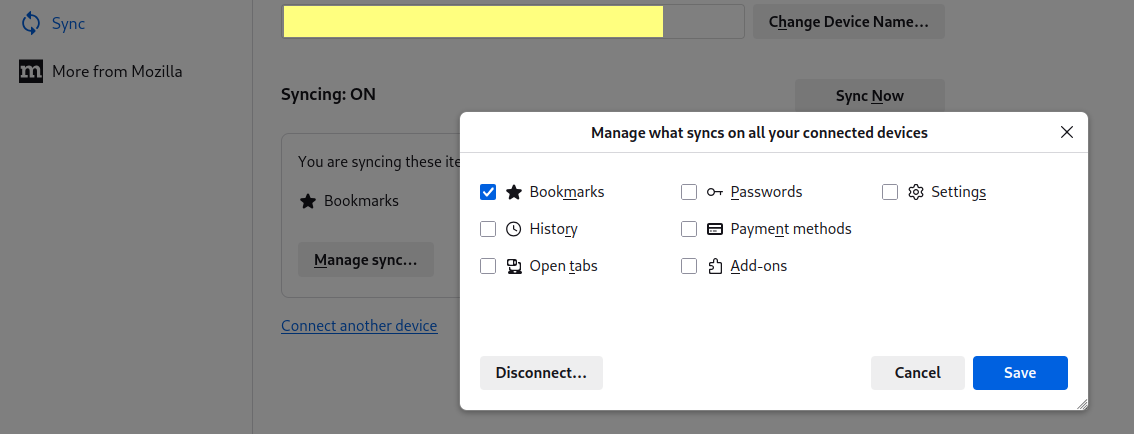
From the main menu, go to "Settings", then (from the left column) "Sync", then click the "Manage sync" button.

You can choose what does and doesn't sync, so in your situation you probably want to check "Passwords" and uncheck everything else.