Join us to show up for other Firefox users 🦊. Earn fun badges and Mozilla swag vouchers! Find out more: https://mzl.la/askafox150

Windows 10 reached EOS (end of support) on October 14, 2025. If you are on Windows 10, see this article.

Támogatás keresése

Kerülje el a támogatási csalásokat. Sosem kérjük arra, hogy hívjon fel egy telefonszámot vagy osszon meg személyes információkat. Jelentse a gyanús tevékenységeket a „Visszaélés bejelentése” lehetőséggel.

További tudnivalók

A témacsoportot lezárták és archiválták. Tegyen fel új kérdést, ha segítségre van szüksége.

Can’t see “Manage Site List” for Multi-Account Containers

Hi there,

I’m using the Firefox Multi-Account Containers extension and would like to remove a site that’s been set to "Always open in [X] container." However, I don’t see a “Manage Site List” option anywhere in the container settings as seen here: https://support.mozilla.org/en-US/kb/containers

Here’s what I’ve tried so far:

   I’ve clicked the Containers icon and selected the gear ⚙ to edit a container.
   I enabled privacy.userContext.siteAssignments.enabled in about:config and set it to true.
   I restarted Firefox (with session restore on), but still no option appears to view or manage assigned sites.

I’m on Firefox Desktop (Mac), and I’ve confirmed that I’m using the official Multi-Account Containers extension.

Is this a bug, a UI change, or something I’m missing? I’d really prefer not to manually edit the containers.json file if there’s a built-in way to manage these assignments.

Thanks so much for any guidance!
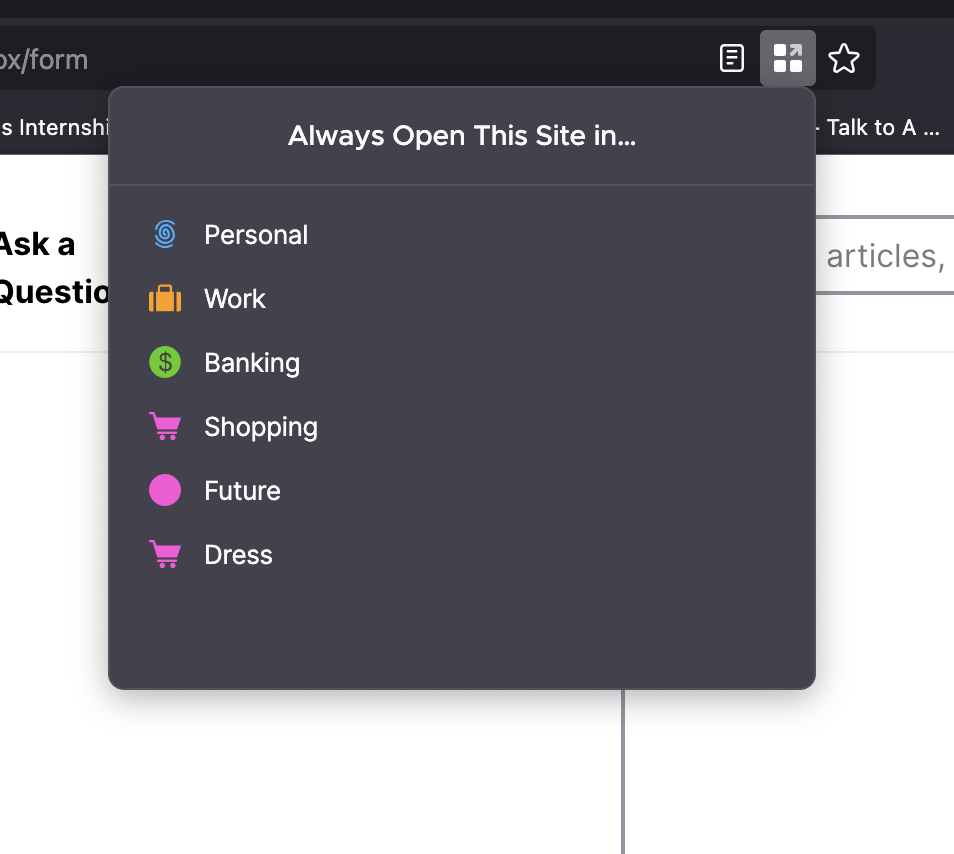
Hi there, I’m using the Firefox Multi-Account Containers extension and would like to remove a site that’s been set to "Always open in [X] container." However, I don’t see a “Manage Site List” option anywhere in the container settings as seen here: [https://support.mozilla.org/en-US/kb/containers ] Here’s what I’ve tried so far: I’ve clicked the Containers icon and selected the gear ⚙️ to edit a container. I enabled privacy.userContext.siteAssignments.enabled in about:config and set it to true. I restarted Firefox (with session restore on), but still no option appears to view or manage assigned sites. I’m on Firefox Desktop (Mac), and I’ve confirmed that I’m using the official Multi-Account Containers extension. Is this a bug, a UI change, or something I’m missing? I’d really prefer not to manually edit the containers.json file if there’s a built-in way to manage these assignments. Thanks so much for any guidance!
Csatolt képernyőmentések

Összes válasz (1)

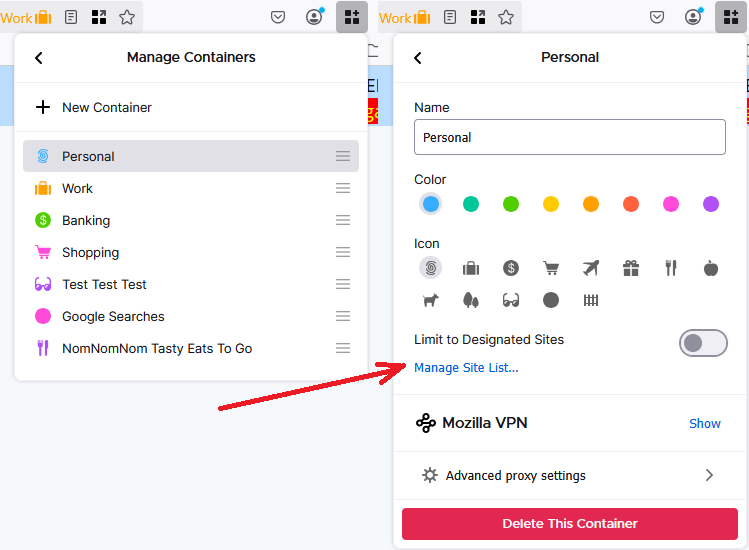
If you use the main toolbar button to go into Manage Containers, then click a specific container, there is a link about halfway down to manage the site list. I have attached a screenshot for reference.