


Thunderbird Update Window
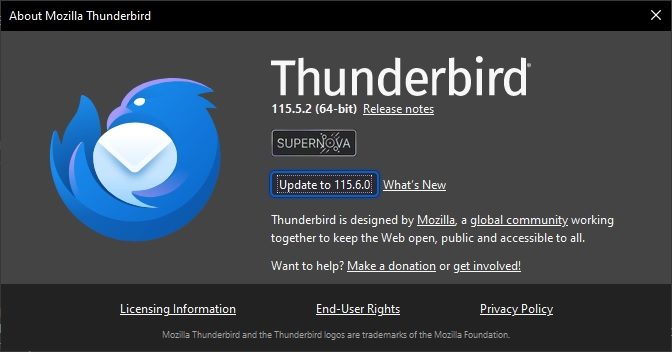
Before I updated to Supernova, when I opened Thunderbird and there was an update available, a window would automatically open in Thunderbird showing the available update (screenshot attached), which allowed me to read the Release Notes to see what was being updated, before applying the update.
However, since updating to Supernova, this no longer happens.
I have always had my settings set to General / Updates / Check for updates, but let me choose whether to install them and as I said, this worked until updating to Supernova.
So can someone tell me what I need to do, to get the update window opening automatically again?
Thanks.
Összes válasz (5)
Anyone got any ideas as I'm still not getting the update window opening!?!?
That window is always available via 'Help' > 'About Thunderbird' If you are up to date or not, checking via that method means you can check anytime. When it says there 's an update available you can check the release notes.
That works for me, thanks.
In recent versions if you selected to check, but ask whether to install, you usually get a pop up asking whether to update or not and it will have text link which says 'Learn more' and that link will also open a tab discussing release info.
Firefox still automatically opens a window when there is an available update so is there something in the Firefox about:config settings that is possibly switched on but it is not switched on in Thunderbird about:config settings that is preventing Thunderbird automatically opening an update window?