


undeleting emails

When my cat walked across my keyboard and somehow deletes multiple emails from my inbox, I started searching for a way to undelete them. The only icon for the trash folder I can find is the one that's labeled "Empty Trash". I've searched Firebird Help for terms like "undelete" and "access trash folder", "retrieve from trash", etc etc, but have found no mention of this common problem, or the common solution that so many other applications have. I also searched settings for "trash" but found nothing related. What am I doing wrong?
Kiválasztott megoldás
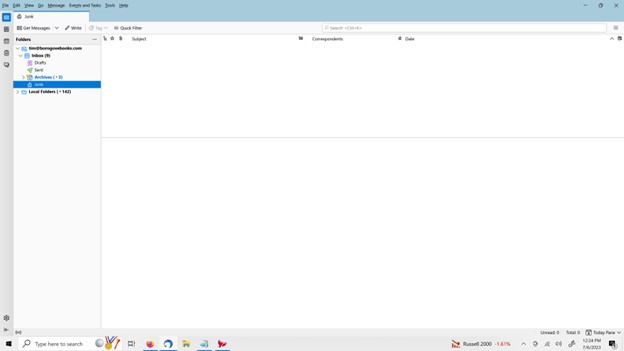
if this is an IMAP account, rightclick account name, click subscribe and tick the trash folder so that it is visible.
Összes válasz (5)
Open the trash folder, rightclick the desired messages, and click to move to wherever you want them.
The problem is that the only trash folder I have is in my local folders, and it just has a handful of old files. Here's a picture of my non-local folders.
Kiválasztott megoldás
if this is an IMAP account, rightclick account name, click subscribe and tick the trash folder so that it is visible.
Your other option, if IMAP, is to log onto your online account and retrieve the messages there.
Problem solved. Thank you!