Windows 10 reached EOS (end of support) on October 14, 2025. If you are on Windows 10, see this article.

Támogatás keresése

Kerülje el a támogatási csalásokat. Sosem kérjük arra, hogy hívjon fel egy telefonszámot vagy osszon meg személyes információkat. Jelentse a gyanús tevékenységeket a „Visszaélés bejelentése” lehetőséggel.

További tudnivalók
A témacsoportot lezárták és archiválták. Tegyen fel új kérdést, ha segítségre van szüksége.
Archivált

One of five yahoo IMAP accounts "suddenly - todat" will NOT fetch emails.

TedT_USA megválaszolva
TedT_USA

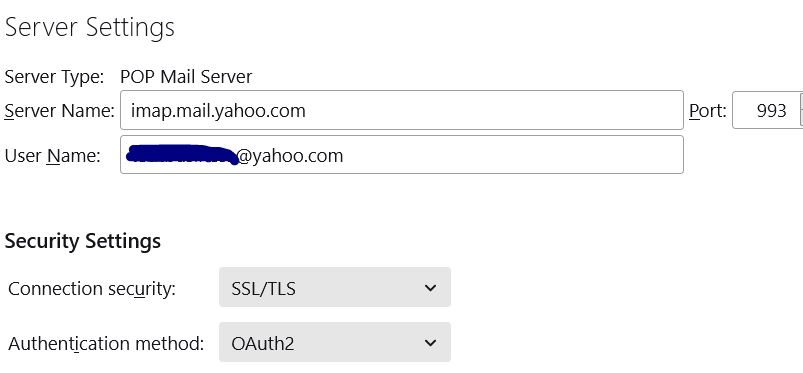
One of five yahoo IMAP accounts suddenly today will NOT fetch emails. Yes, all worked last night. Error message = “an error occurred with the POP3 mail server Mail server imap.mail.yahoo.com responded”

= =

All five are identically configured in TB All five can send emails via TB Four of five can receive YAHOO and GMAIL emails Inbound = imap.mail.yahoo.com -- Port 993, OAuth2 Outbound = smtp.mail.yahoo.com -- Port 465, OAuth2 [Tried 587 with no change in behavior] OAuth2 has been set for quite a while. Requires SSL/TLS is set on all five accounts

= =

The “missing” inbound messages are sitting in my Yahoo inbox.

= =

Changed password on the one account after fetch failure and registered it via Yahoo & Thunderbird, with no change. Closed and restarted Thunderbird multiple times

= =

I’m not using POP3 and I did not change from POP3 to IMAP. IMAP has been in use for years on all accounts. Never used POP3.

= =

And, I am able to successfully fetch inbound emails on my phone via the K9 app which is configured identically to the five registered on Thunderbird.

= =

TB Version = 91.10.0 Windows 10 PRO

= =

Any clues?
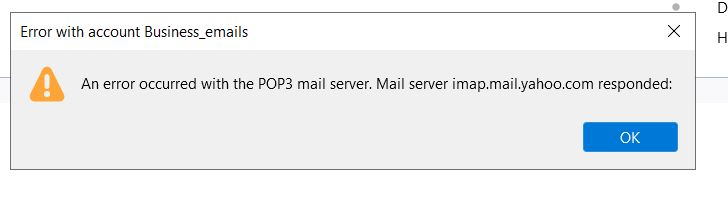
One of five yahoo IMAP accounts suddenly today will NOT fetch emails. Yes, all worked last night. Error message = “an error occurred with the POP3 mail server Mail server imap.mail.yahoo.com responded” = = = = All five are identically configured in TB All five can send emails via TB Four of five can receive YAHOO and GMAIL emails Inbound = imap.mail.yahoo.com -- Port 993, OAuth2 Outbound = smtp.mail.yahoo.com -- Port 465, OAuth2 [Tried 587 with no change in behavior] OAuth2 has been set for quite a while. Requires SSL/TLS is set on all five accounts = = = = The “missing” inbound messages are sitting in my Yahoo inbox. = = = = Changed password on the one account after fetch failure and registered it via Yahoo & Thunderbird, with no change. Closed and restarted Thunderbird multiple times = = = = I’m not using POP3 and I did not change from POP3 to IMAP. IMAP has been in use for years on all accounts. Never used POP3. = = = = And, I am able to successfully fetch inbound emails on my phone via the K9 app which is configured identically to the five registered on Thunderbird. = = = = TB Version = 91.10.0 Windows 10 PRO = = = = Any clues?
Csatolt képernyőmentések

Összes válasz (1)

Sorry about bold dashed lines above, not that was not my editing “Select checkbox “Accept cookies from sites” was previously set