


Windows 10 reached EOS (end of support) on October 14, 2025. If you are on Windows 10, see this article.

Támogatás keresése

Kerülje el a támogatási csalásokat. Sosem kérjük arra, hogy hívjon fel egy telefonszámot vagy osszon meg személyes információkat. Jelentse a gyanús tevékenységeket a „Visszaélés bejelentése” lehetőséggel.

További tudnivalók

A témacsoportot már lezárták és archiválták. Tegyen fel új kérdést, ha segítségre van szüksége.

Saving e-Mail

  • 1 válasz
  • 1 embernek van ilyen problémája
  • 148 megtekintés
  • Utolsó üzenet ettől: sfhowes
  • Zárolt

Recent Thunderbird update, 91.5.1 and maybe the previous, when I want to Save and e-Mail, Thunderbird gives an excessive name beginning with the e-Mail Subject, then the Sender's EMail Addree, then the Date. For 20-plus years my Netscape e-Mail, and then Thunderbird only gave the Subject as the initial file name. I am very very used to working with the Subject, only. Now I have to go into the e-Mail name and Delete the Sender's EMail Address and the Date. Is there a way to get the program to only save as the Subject line, without having to correct each and every e-Mail I want to save?

Recent Thunderbird update, 91.5.1 and maybe the previous, when I want to Save and e-Mail, Thunderbird gives an excessive name beginning with the e-Mail Subject, then the Sender's EMail Addree, then the Date. For 20-plus years my Netscape e-Mail, and then Thunderbird only gave the Subject as the initial file name. I am very very used to working with the Subject, only. Now I have to go into the e-Mail name and Delete the Sender's EMail Address and the Date. Is there a way to get the program to only save as the Subject line, without having to correct each and every e-Mail I want to save?

Összes válasz (2)

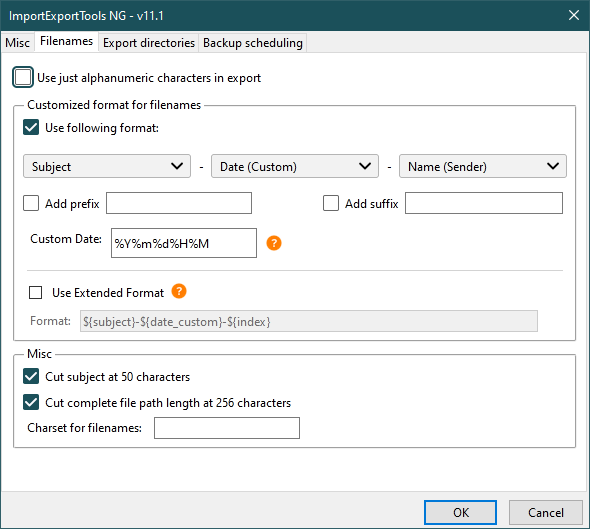
The ImportExportTools NG add-on allows custom filenames (see picture).
This question has been locked because the original author has deleted their account. While you can no longer post new replies, the existing content remains available for reference.