


too many temp files
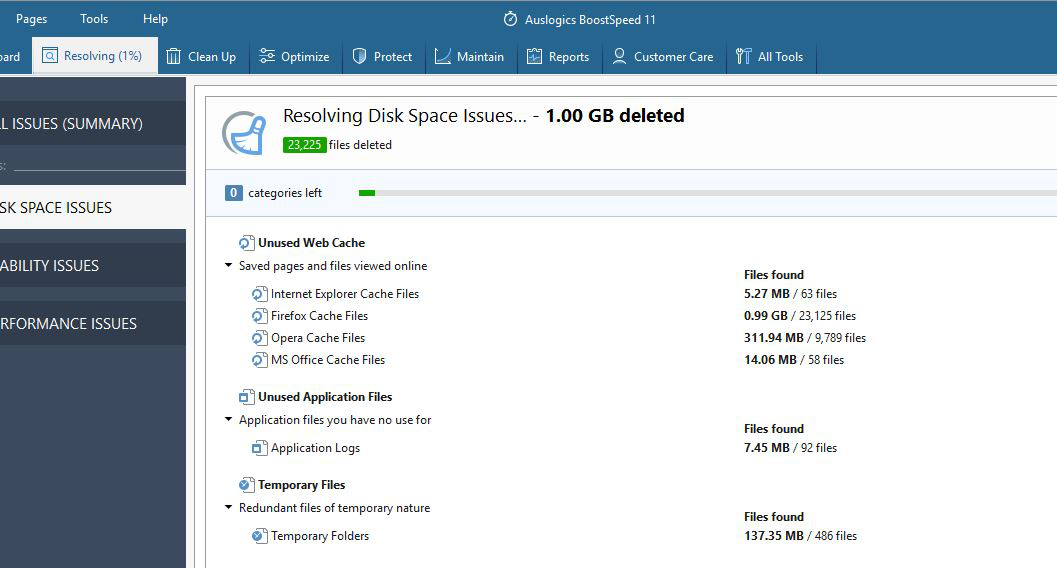
I am using "Auslogics BoostSpeed 11" and always getting too many temp files, refer screen shot, I am using Mozilla less compere to other bowers.
Összes válasz (2)
By default, Firefox judges how much space it can use for caching based on your system specs. This helps to boost performance in most cases.
If you want to manually limit the cache size, you should be able to do that by doing the following:
- Go to
about:configin Firefox. - Bypass the warning.
- Find the
browser.cache.disk.smart_size.enabledpreference. - Set it to
false. - Find the
browser.cache.disk.capacitypreference. - Set preference to the number of kilobytes you want Firefox to use for caching. The maximum is ~1GB (1048576KB).
Hope this helps.
NOTE: You may need to restart Firefox for the changes to be applied.
Note that best is not to use external cleanup software but to use builtin Firefox means to clear data in the profile folder. The screenshot you showed doesn't give any detail about what is considered as files in the Firefox disk cache. There are a lot of files stored in the secondary profile location used for the disk cache in "AppData\Local". This includes the thumbnails for the new tab page and safebrowsing and Content Blocking data.