


Why iy firefox registering sync requests on my tablet as, Web Session, Firefox Mobile 64?

Hello everytime I try to log into firefox on my android tablet, It keeps registering logins as Web Session, Firefox Mobile <version number> what causes this error and How can I fix it?
Összes válasz (3)
This is what it looks like when i go on the connected devices page
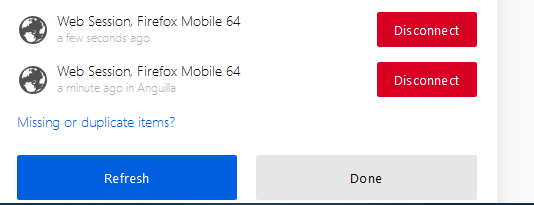
It seems like you have more than one possible device to sync with, which are not in sync with each other. If not, is "duplicate items" clickable?
A quick fix may be to click disconnect on one or both then run sync again.
I am not overly familiar with sync, so it may even be your last closed session, and the ine before it, from the same device. Perhaps try clearing history, ensuring that session data is selected to be cleared, at least once.