

A témacsoportot lezárták és archiválták.
Tegyen fel új kérdést, ha segítségre van szüksége.

Archivált
Address bar suggests broken URLs

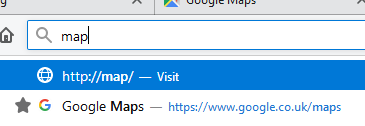
If I type "map" into the address bar, the default option Firefox provides me is to visit http://map/, a website that does not exist. The option that I actually want, my bookmark to Google Maps, is displayed an the second option.
How can I stop Firefox from providing the useless option by default? If I type "goog" then it correctly suggests Google first.
If I type "map" into the address bar, the default option Firefox provides me is to visit http://map/, a website that does not exist. The option that I actually want, my bookmark to Google Maps, is displayed an the second option.
How can I stop Firefox from providing the useless option by default? If I type "goog" then it correctly suggests Google first.
Összes válasz (3)

That would be the form filler built into Firefox. Click in the field, enter a character or two and STOP ! Using the arrow keys, highlight an unwanted entry. Then press Delete (Mac=Shift Delete). Repeat as needed.
...what? This is the address bar. The item can't be deleted because it isn't a bookmark or history location.
Please follow the posted instructions.